Tractor-Implement Automation™ — Status Page
LX1057101-UN-23JUL13
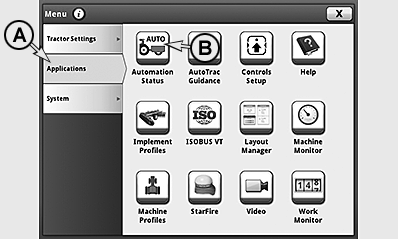
Press Automation Status icon (B) and access automation status page.
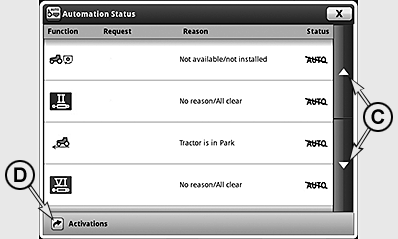
On the status page, the status of all the functions available for TIA™ are displayed.
If no TIA™-capable implement is connected, only a text message appears on the display.
LX1057102-UN-23JUL13
To activate the implements, press activating TIA™ button (D) and access the page for activating the implements. See also Activate Tractor-Implement Automation™ Equipment in this section of this Operator’s Manual.
The status page has four columns:
|
Function |
Auto/Command |
Cause |
Status |
|---|---|---|---|
|
All functions available for TIA™ displayed |
•Current command from implement appears on display if function is in auto mode and implement is commanding function. |
•No Reason/All clear - function is fault-free and can be automated by implement. •Brief text - function is not ready to perform commands from implement. |
•AUTO -function is currently commanded and has no threshold. •AUTO -function is currently not controlled by implement or cannot be controlled by it. Operator has control, or must enable function. •!AUTO! -function currently has a fault. Cause is displayed in a brief text in second column. •AUTO↑ -function has an upper threshold. Command from implement is too high. •AUTO↓ -function has a lower threshold. Command from implement is too low. |
|
CommandCenter is a trademark of Deere & Company TIA is a trademark of Deere & Company TIA is a trademark of Deere & Company |
KT81203,00004E5-19-20170928 |