HVAC Settings—Generation 4 CommandCenter™
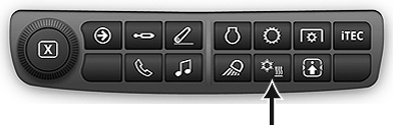
RXA0133716-UN-16JUL13
-
Select Menu.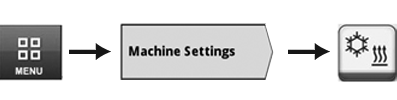
RXA0147936-UN-13APR15 - Select Machine Settings tab.
- Select HVAC (Heating, Ventilation, and Air Conditioning) icon.
RXA0133683-UN-19JUL13
RXA0133684-UN-19JUL13
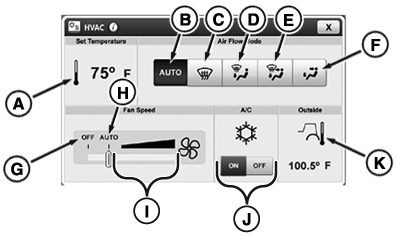
A—Set Temperature Module: Select to
access Set Temperature page (L).
B—Auto
Air Flow Toggle: Select for air flow to be automatically adjusted.
C—Defrost Toggle: Select to activate defrost.
D—Defrost and Floor Toggle: Select to
activate defrost and floor vents.
E—Defrost,
Floor and Cab Toggle: Select to activate defrost, floor, and
cab vents.
F—Cab and Floor Toggle: Select to activate floor and cab vents.
G—Fan OFF: Move slide bar to OFF position to turn fan off.
H—Fan AUTO: Adjust slide bar to AUTO position
to have fan speed automatically adjust to maintain set temperature.
I—Fan Increment Bar: Use to adjust fan
speed. As slide moves right, fan speed increases. As slide moves left,
fan speed decreases.
If system is not cooling properly, turn air conditioning switch off to avoid possible compressor damage.
J—A/C Toggle: Use to turn A/C ON or
OFF.
K—Outside Temperature Module: Displays the temperature outside of the cab.
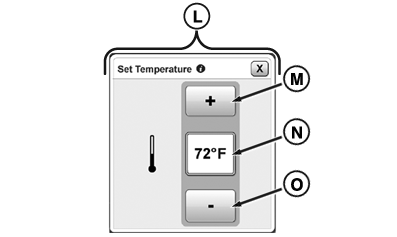
L—Set Temperature Page: Page used to adjust cab
temperature.
M—Increase Button: Select to increase temperature in cab.
N—Display Temperature Box: Displays the temperature setting.
O—Decrease Button: Select to decrease
temperature in cab.
|
KT81203,0000517-19-20170905 |