Radio Faceplate Features
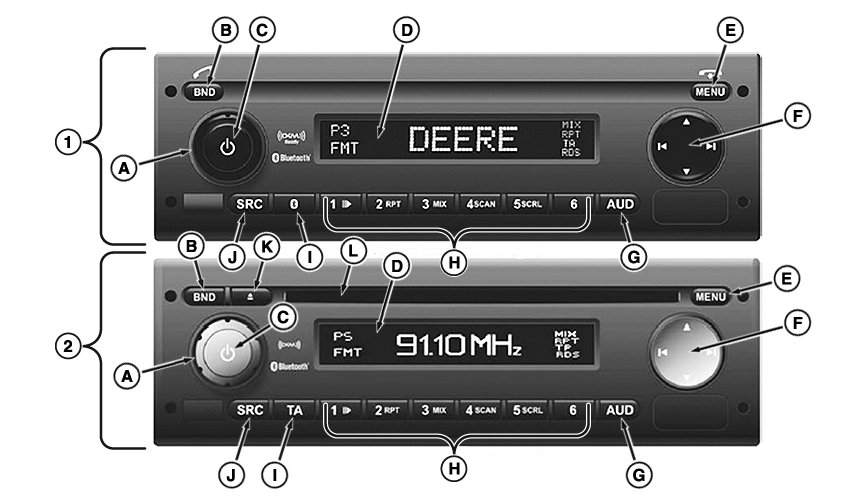
Radio faceplate is made up of different buttons, knobs, and switches that perform various audio functions.
RXA0160581-UN-16AUG17
|
Radio Features |
||
|---|---|---|
|
Features |
Radio Type |
|
|
Premium (1) |
Premium with CD (2) |
|
|
Radio |
• |
• |
|
Connection of External Devices |
— |
• |
|
CD |
— |
• |
|
MP3/WMA |
— |
• |
|
USB |
— |
• |
|
Bluetooth® |
• |
• |
|
SAT Radio |
XM-ready |
• |
Radio Faceplate Controls
A—Volume Control Knob: Turn clockwise to increase and counterclockwise to decrease volume.
B—BND Button: Press briefly to select memory level or wave band. Press and hold to start T-STORE function. T-STORE function scans band and sets FMT or AMT station buttons 1-6 to strongest signals. Press to accept phone call when call is coming in.
C—Power Button: Press and hold for 2 seconds to turn radio on or off. Press briefly during operation to mute radio.
D—Display: Shows current audio activity/information.
E—Menu Button: Access menu for basic settings. When phone is in use, press to end call
F—Multi-Function Rocker Switch: Use to navigate within display and switch functions. Press left or right to seek up or down to next available station. Press up or down to manually tune frequency, change category when using XM (when CAT mode is active), and browse folders when using MP3, CD, or USB.
G—AUD Button: Press briefly to access audio menu to adjust treble, middle, bass, balance and fade. Press and hold to restore treble, bass and middle back to factory sound setting for currently used audio source. Press and hold to restore balance and fade back to factory sound setting for all audio sources.
H—Station Buttons Save as presets. Press and hold to save current station (beep will sound). Press again to bring radio back to saved station. Depending on radio type, station buttons may have these specialized functions:
- Station Button 1/Play or Pause Button: When CD, MP3, or USB is in use, press to pause current track. Press again to play.
- Station Button 2/RPT: When CD is in use, press to repeat current track until pressed again. When MP3 or USB is in use, press to repeat track. Press again to repeat all tracks in current playlist. Press a third time to turn off.
- Station Button 3/MIX: When CD is in use, press to play songs at random until pressed again. When MP3 or USB is in use, press to play songs in current playlist at random. Press again to play all songs at random. Press a third time to turn off.
- Station Button 4/SCAN: When CD, MP3, or USB is in use, press to play all tracks for approximately 10 seconds each until pressed again.
- Station Button 5/SCRL: When CD, MP3, or USB is in use, press to turn scrolling track information on display on or off.
- Station Button 6: When CD, MP3, or USB is in use, press to switch between display of elapsed and remaining playing time of current track.
I—TA Button: Press to switch from user/audio menus to current source or exit radio scan functions. When MP3, CD or USB is in use, press and hold to activate playlist mode.
J—SRC Button: Source selection between radio and AUX (also CD, USB, Bluetooth® and XM depending on model) provided medium is inserted or device is connected and turned on.
K—CD Eject Button: Press to eject CD.
L—CD Slot
Playlist must be created on computer and saved as *.m3u or *.pls.
|
Bluetooth is a trademark of Bluetooth SIG |
KT81203,0000580-19-20170816 |