Select Radio Source with Generation 4 CommandCenter™
Use radio source tabs on Generation 4 CommandCenter™ to select radio source.
When radio is on, radio page navigates to home page of current source selected. When radio is off, content blocker displays.
Selecting radio source will not turn radio on. Turn radio ON by pressing ON/OFF button on radio faceplate.
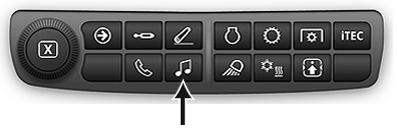
RXA0133718-UN-16JUL13
-
Select Menu.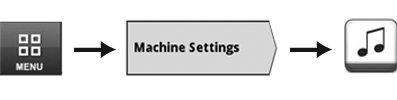
RXA0147929-UN-13APR15 - Select Machine Settings tab.
- Select Audio icon.
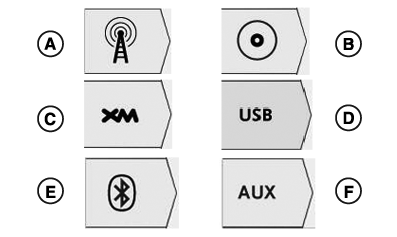
- Select desired radio source tab:
RXA0132517-UN-15MAY13
A - FM, AM, and Weather
B - CD/MP3 (Premium Radio)
C - XM (Premium Radio)
D - USB (Premium Radio)
E - Bluetooth® Audio (Premium Radio)
F - Auxiliary
|
CommandCenter is a trademark of Deere & Company Bluetooth is a trademark of Bluetooth SIG |
KT81203,0000582-19-20170105 |