Premium Radio USB Home Page
Navigate to USB home page. See Select Radio Source with Generation 4 CommandCenter™ in this section of this Operator’s Manual.
Connect USB using USB input, located on right-hand console/storage tray, to play stored music. See External Sources (Premium Radio) page in this section of this Operator’s Manual.
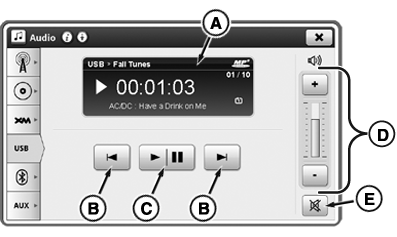
RXA0132516-UN-28JUN13
B—Next/Previous Track: Select to skip back to beginning of current track or ahead to beginning of next track. Press previous button twice to skip to previous track.
C—Play/Pause: Play or pause track.
D—Volume Controls: Adjust volume.
E—Mute: Silence sound.
|
CommandCenter is a trademark of Deere & Company |
KT81203,0000586-19-20170105 |