Premium Radio Bluetooth® Home Page (If Equipped)
Navigate to Bluetooth® home page. See Select Radio Source with Generation 4 CommandCenter™ in this section of this Operator’s Manual.
Connect Bluetooth® enabled device to play stored music.
Radio system is equipped with Bluetooth®, which allows data transfer between radio system and paired close-range Bluetooth® device such as cell phone. Music stored on device does not transfer to CommandCenter™
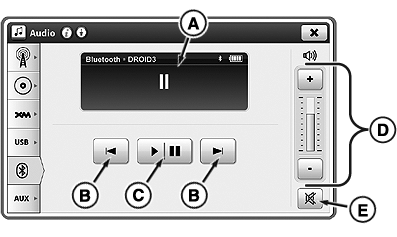
RXA0132504-UN-28JUN13
B—Next/Previous Track: Skip back to beginning or ahead to beginning of next track. Press previous button twice to skip to previous track.
Not all devices support pause function. Devices may mute sound, but not pause play.
C—Play/Pause: Play or pause track.
D—Volume Adjustment: Adjust volume.
E—Mute: Silence sound.
|
Bluetooth is a trademark of Bluetooth SIG CommandCenter is a trademark of Deere & Company |
KT81203,0000587-19-20170105 |