Controls Setup

PC15326-UN-08JUL13
Controls Setup configures integrated tractor joystick, CommandARM™ levers, iTEC™ buttons, and third-party devices to control tractor or implement functions. ISO Aux implements configures to tractor joystick or third-party device.
Set up assignments:
- Select Menu.
- Select Applications tab.
- Select Controls Setup application.
- Select from following tabs on left-hand side of page:
Unlock tractor joystick to activate default and custom
(manually set) assignments. See CommandARM™ Joystick-Custom Setup
in Selective Control Valves section of this Operator’s Manual.
- Integrated Tractor Joystick: assign to control tractor and implement functions (e.g. front hitch).
- CommandARM™ Levers and iTEC™ Buttons: assign to control tractor and implement functions (e.g. rear hitch)
- Third-Party Devices: any mechanism, John Deere or non-John Deere, attached to ISOBUS. Once attached, assign control to tractor and implement functions (e.g. wagon).
- ISO Aux implements: assign implement (e.g. wagon) function to a specific button on tractor joystick.
- Select reconfigurable assignment module.
Depending on selected source, the following combinations (assignments) are possible
- Integrated Tractor Joystick, CommandARM™ Levers and iTEC™ buttons, and Third-Party Devices: Input + Source + Function
- ISO Aux Implements: Function + Device + Input
Manage Assignments:

RXA0156706-UN-11JAN17
To edit assignments for tractor joystick, CommandARM™ levers, or iTEC™ buttons, select desired reconfigurable assignment module. To remove assignment, select remove button (A) (in source overlay).
To edit assignments for third-party devices or ISO Aux implements, select edit button (B) in desired reconfigurable assignment module. To remove assignment, select trash button (C).
ISO Aux, Custom, and Defaults:
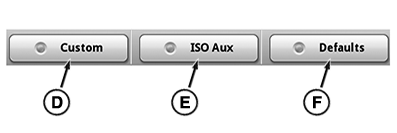
RXA0156710-UN-12JAN17
Select ISO Aux and Custom buttons to enable custom assignments for ISO Aux implements.
ISO Aux (D): determines if messages from tractor joystick are sent to ISO Aux implement. Select to enable implement functions. Select again to disable. Functions are stored until operator edits corresponding assignment.
Custom (E): enables all customized assignments across all groups.
Defaults (F): clears and restores any custom control assignments to factory default settings.
|
CommandARM is a trademark of Deere & Company iTEC is a trademark of Deere & Company |
KT81203,00005B2-19-20170111 |