Slip Calibration
 Avoid injury. Perform calibration in safe and open
area that is clear of objects and bystanders.
Avoid injury. Perform calibration in safe and open
area that is clear of objects and bystanders.
Perform slip calibration if:
- Radar calibration has been performed.
- Slip is displayed when slip should not be present.
- Ballast of tractor was changed.
-
Select Menu.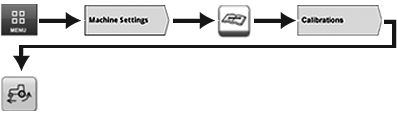
RXA0147928-UN-13APR15 - Select Machine Settings tab.
- Select Maintenance & Calibrations icon.
- Select Calibrations tab.
Tractor must be in motion for slip calibration icon to
appear.
-
Select Slip Calibration icon. Slip calibration can be canceled by selecting cancel button (B).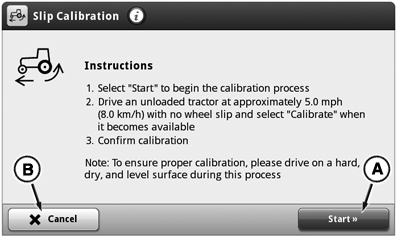
RXA0147582-UN-10MAR15
- Select Start button (A) to begin slip calibration process.
- Drive unloaded tractor, on hard, dry and level surface, at least 8 km/h (5 mph).
-
Select Calibrate button (C).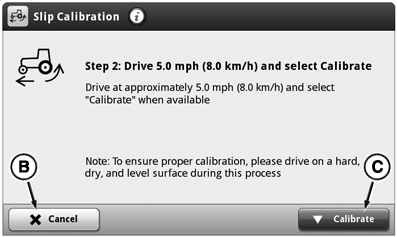
RXA0147583-UN-10MAR15 -
Select OK button (D) to complete slip calibration.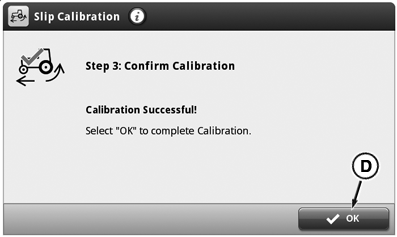
RXA0147584-UN-10MAR15
If slip calibration is unsuccessful after three attempts, see your John Deere™ dealer.
|
John Deere is a trademark of Deere & Company |
KT81203,00008AE-19-20170719 |