CommandCenter™ Transmission Main Page
The e18™ transmission offers three modes to optimize fuel efficiency and load control from tractor.
-
Full Auto Mode (A) — Automatically adjusts Fuel Economy Minimum Engine Speed, allowing tractor to use most fuel efficient engine speed under light load. This mode automatically responds to loads created by use of hitch or SCVs (load anticipation). During PTO use, top engine speed is automatically limited to provide appropriate PTO speed.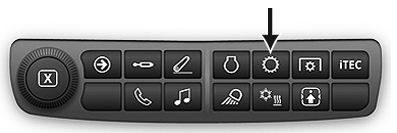
RXA0133712-UN-16JUL13 -
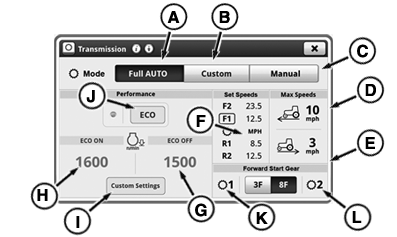
RXA0143051-UN-26JUN14A - Full AUTO Mode
B - Custom Mode
C - Manual Mode
D - Maximum Forward Speed Module
E - Maximum Reverse Speed Module
F - Set Speeds Module
G - ECO Engine Speed Off Module
H - ECO Engine Speed On Module
I - Custom Settings Button
J - ECO Level Button
K - Forward Start Gear 1
L - Forward Start Gear 2
Custom Mode (B) — Operator can choose Engine Speed Droop, Minimum Engine Speed, or Load Anticipation reactions. - Manual Mode (C) — Operator can choose Engine Speed Droop, Minimum Engine Speed, or Load Anticipation reactions.
- Press Transmission Shortcut Button on Navigation Bar.
Forward maximum speed (D) or reverse maximum speed (E) displays maximum forward or reverse speed limits. To change maximum speed, select appropriate maximum speed module. Max Speed Forward or Max Speed Reverse page appears. Use increase (+) or decrease (-) Buttons to set maximum speed. If operator changes maximum forward or reverse speed below current set speed, set speed decreases to maximum speed and vehicle speed would decrease.
|
RD47322,00006B8-19-20170727 |