Custom Transmission Settings
All settings pertaining to this page are only applicable when Efficiency Manager™ is not in Full Auto Mode.
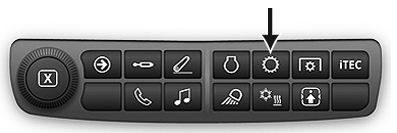
RXA0133712-UN-16JUL13
Transmission Shortcut Button on Navigation Bar
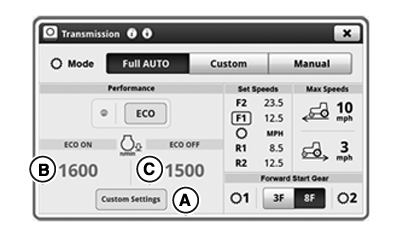
RXA0143050-UN-07OCT14
Transmission Home Page
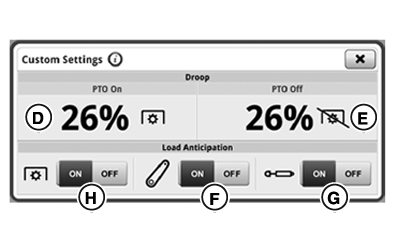
RXA0130327-UN-07OCT14
Custom Settings Page
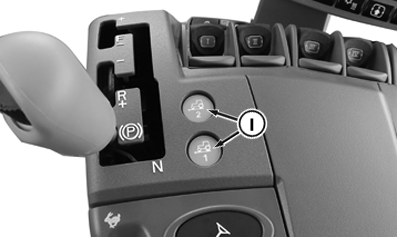
RXA0142302-UN-07OCT14
Efficiency Manager™ Buttons
A - Custom Settings Button
B - ECO Engine Speed ON Module
C - ECO Engine Speed OFF Module
D - Engine Droop PTO ON Module
E - Engine Droop PTO OFF Module
F - Hitch Load Anticipation Toggle
G - SCV Load Anticipation Toggle
H - PTO Load Anticipation Toggle
I - Efficiency Manager™ Buttons
Auto Shift Engine Speed Droop sets amount of engine speed drop (under full load) allowed before Custom mode automatically downshifts. A lower percentage results in less rpm drop being allowed before downshift.
Under light loads, fuel can be saved by shifting up and throttling back. In Custom mode Efficiency Manager™ shifts up and throttle back to minimum engine speed selected. Minimum engine speed selection can be toggled between 2 adjustable values (B or C) by toggling between ECO ON/OFF.
Load Anticipation features all Efficiency Manager™ to predict loads due to activation of hitch, SCV, or PTO. When activated, transmission can downshift and engine speed increases above desired minimum rpm when hitch, SCV, or PTO are used. Load Anticipation is enabled in Full Auto mode by default.
In Custom or Manual mode, Load Anticipation is enabled when appropriate toggle (hitch (F), SCV (G), or PTO (H)) is turned on.
Anticipation features are only active in Manual mode when using Efficiency Manager™ via command buttons 1 and 2.
If hitch is lowered or raised, system downshifts if engine speed drops below 1500 rpm.
If SCV is set to extend or retract above 25% flow rate, transmission downshifts automatically if predicted rpm is below desired minimum. SCV set to continuous automatically if predicted rpm is below desired minimum.
RXA0133712-UN-16JUL13
Transmission Shortcut Button on Navigation Bar
RXA0143050-UN-07OCT14
Transmission Home Page
RXA0130327-UN-07OCT14
Custom Settings Page
A - Custom Settings Button
B - ECO Engine Speed ON Module
C - Engine Droop PTO ON Module
D - Engine Droop PTO OFF Module
E - Hitch Load Anticipation Toggle
F - SCV Load Anticipation Toggle
G - PTO Load Anticipation Toggle
-
Press Menu Button.
-
On Mode bar, select Custom or Manual Mode.
-
On Transmission page, select Custom Settings button (A).
Set Auto Shift Engine Speed Droop PTO ON
Auto Shift Engine Speed Droop PTO ON can be set from 6% —26 %.
- Select Auto Shift Engine Speed Droop PTO ON module (D).
- Adjust percentage value to desired value by using increase (+) and decrease (-) buttons.
Set Auto Shift Engine Speed Droop PTO OFF
Auto Shift Engine Speed Droop PTO OFF can be set from 14% — 26 %.
- Select Auto Shift Engine Speed Droop PTO OFF module (E).
- Adjust percentage value to desired value by using increase (+) and decrease (-) buttons.
Turn Load Anticipation ON
- On Custom Setting page, select Hitch Load (F), SCV Load (G), or PTO Load Anticipation (H) ON or OFF toggle to control system load anticipation.
|
Efficiency Manager is a trademark of Deere & Company |
RD47322,00006BA-19-20150505 |