Activate and Set Maximum Set Speed
Limiting engine speed in light load situations may improve fuel economy. Maximum Set Speed utilizes a constant speed governor curve, providing instant response to varying loads. Two different Maximum Set Speed speeds can be set, enabling operator to toggle quickly from one to the other.
Activate Maximum Set Speed
Engine must be running for Maximum Set Speed adjustment to operate.
-
Select Engine Shortcut Button on Navigation Bar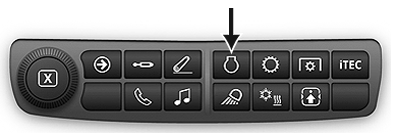
RXA0133711-UN-16JUL13 -
When engine page appears, select Maximum Set Speed 1 (A) or 2 (B) On/Off toggle button.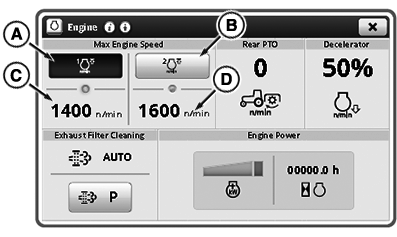
RXA0153804-UN-02SEP16
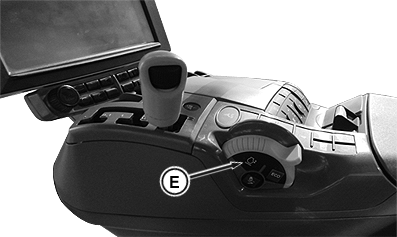
RXA0139472-UN-24FEB14
Adjust Maximum Set Speed Set Speed
Maximum Set Speed is an upper limit to engine speed. Engine speed limit can be adjusted from 1100 to 2150 RPM. Changes to Maximum Set Speed take place immediately.
-
Select Maximum Set Speed 1 (C) or 2 (D) input module.
-
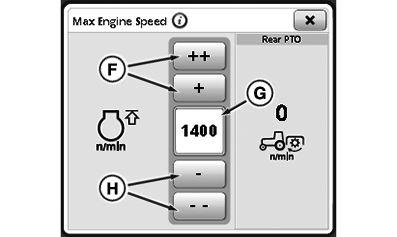
RXA0153766-UN-02SEP16Maximum Set Speed Set Speed 1 Page
When Maximum Set Speed 1 or 2 page appears, select desired speed by using Maximum Set Speed increase (F) or decrease (H) button. “++” and “- -” buttons increase or decrease values at higher rate than “+” and “-” buttons. Maximum Set Speed value appears in Maximum Set Speed input box (G).
|
CommandARM is a trademark of Deere & Company CommandCenter is a trademark of Deere & Company |
TO84419,00002DC-19-20170927 |