Configure SCV - Standard Mode
In standard mode, an SCV can have one time detent setting and one flow detent setting which apply to both extend and retract.
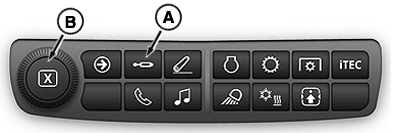
RXA0151869-UN-14APR16
-
Select an individual SCVs (C) to access Standard Mode.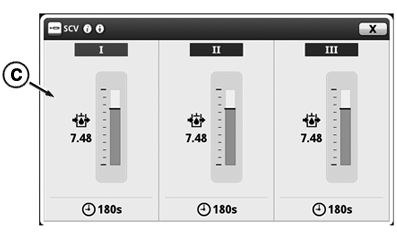
RXA0151870-UN-14APR16 -
Select Time tab (D).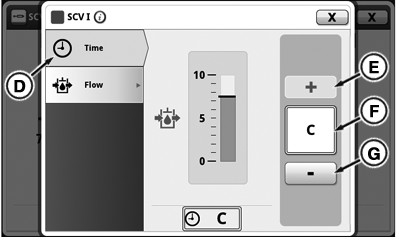
RXA0151871-UN-14APR16 -
Input box (F) displays detent time set. Press increase button (+) (E) to increase time in 1 second increments up to 10 seconds, then in 2 second increments up to 20, then 5 seconds to 30, then by 30 seconds up to C for continuous flow. Pressing button (-) (G) decreases time by same increments. Adjustment dial (B) can also be used.
-
Select Flow tab (H).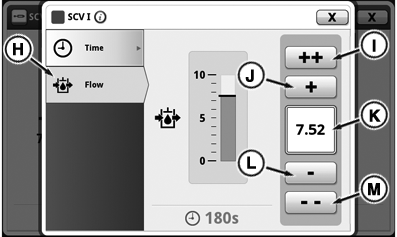
RXA0151872-UN-14APR16 -
Input box (K) displays flow rate set. Flow is shown in increments of 0.04 beginning at 0.04 and increasing to 10. Press increase button (+) (J) will increase flow by 0.04 with each press. Press fast increase button (++) (I) to increase flow by units of 1.00. Pressing decrease button (-) (L) or fast decrease button (--) (M) reduces flow by same increments. Adjustment dial (B) can also be used to change flow rate.
|
TS36762,00001EC-19-20161121 |