Configure SCV - Independent Mode
Some implements require different extend and retract times and flow detents to function correctly. SCVs in Independent Mode have two detent flow and two detent time settings, one for extend and one for retract.
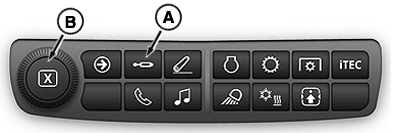
RXA0151869-UN-14APR16
-
Select an SCV that is in Independent Mode.
-
Select Detent Time Retract tab (C) or Detent Time Extend tab (D).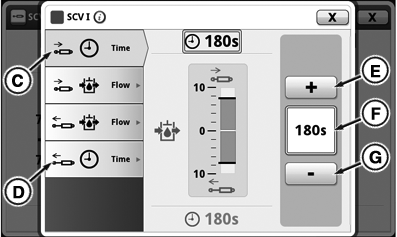
RXA0151875-UN-15APR16 -
Input box (F) displays detent time set. Press increase button (+) (E) to increase time in 1 second increments up to 10 seconds, then in 2 second increments up to 20, then 5 seconds to 30, then by 30 seconds up to C for continuous flow. Pressing button (-) (G) decreases time by same increments. Adjustment dial (B) can also be used to change flow rate.
-
Select Detent Flow Retract tab (H) or Detent Flow Extend tab (I).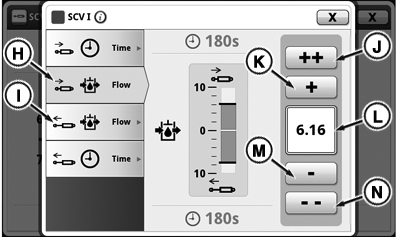
RXA0151876-UN-15APR16 -
Input box (L) displays flow rate set. Flow is shown in increments of 0.04 beginning at 0.04 and increasing to 10. Press increase button (+) (K) will increase flow by 0.04 with each press. Press fast increase button (++) (J) to increase flow by units of 1.00. Pressing decrease button (-) (M) or fast decrease button (--) (N) reduces flow by same increments. Adjustment dial (B) can also be used to change flow rate.
|
TS36762,00001EE-19-20170705 |