Configure SCV - Feature Mode
Feature mode requires an optional connector. To use feature mode, connect implement to tractor before turning key switch to ON. When connected through ISO Bus or implement connector, SCVs automatically enter feature mode. SCV page with feature option is displayed for selected SCVs.
-
Connect tractor to implement.
-
Select SCV Shortcut Button (A) on Navigation Bar.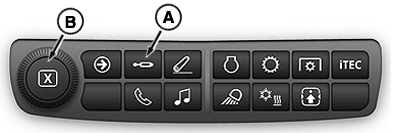
RXA0151869-UN-14APR16 -
Select appropriate SCV to adjust feature mode settings.
-
Select Detent Flow tab (C).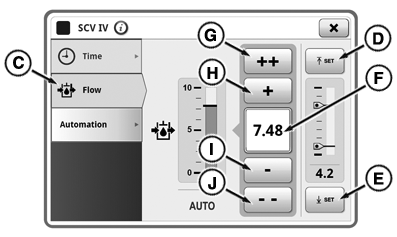
RXA0151877-UN-15APR16 -
Input box (F) displays flow rate set. Flow is shown in increments of 0.04 beginning at 0.04 and increasing to 10. Press increase button (+) (H) will increase flow by 0.04 with each press. Press fast increase button (++) (G) to increase flow by units of 1.00. Pressing decrease button (-) (I) or fast decrease button (--) (J) reduces flow by same increments. Adjustment dial (B) can also be used to change flow rate.
Detent time is controlled by the implement.
Only TouchSet™ Depth Control and Laser Scraper Control uses upper and lower setpoint buttons (D) and (E). See Set TouchSet™ Depth Controls in TouchSet™ Depth Control section of this Operator’s Manual
|
TouchSet is a trademark of Deere & Company |
TS36762,00001EF-19-20170801 |