Configurable Lights
 Avoid injury or death caused by collision with another
vehicle. Follow local laws and regulations for equipment lighting
and marking. Comply with all traffic regulations.
Avoid injury or death caused by collision with another
vehicle. Follow local laws and regulations for equipment lighting
and marking. Comply with all traffic regulations.
Dim road lights to low-beam for oncoming vehicles. Avoid using field lights on public roadways or highways which could temporarily blind or confuse other drivers. Promptly replace or repair damaged or lost lighting devices. See your John Deere dealer.
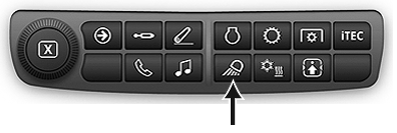
RXA0133717-UN-16JUL13
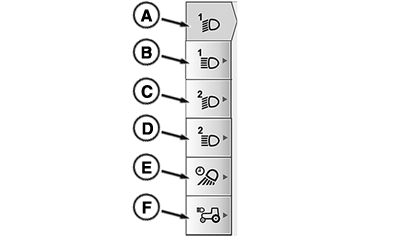
RXA0137115-UN-05DEC13
A - Field 1 Low Beam
B - Field 1 High Beam
C - Field 2 Low Beam
D - Field 2 High Beam
E - Exit Lighting
F - Hood/Belt Line Light (If Equipped)
When page is displayed, operator can select left side tabs (A-F).Page temporarily shows when selector knob transitions from OFF position to road lights or field lights position.
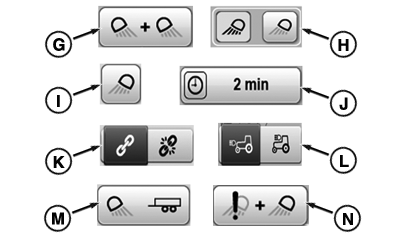
RXA0137114-UN-05DEC13
G—Linked Lights: Lights linked or
paired together that can be unlinked.
H—Unlinked Lights: Unlinked light pair that can be linked.
I—Paired Lights: Light pair that is always
linked.
J—Exit Light Timeout: Allows
operator to select how long selected lights remain ON after light
selector knob is turned to OFF position.
K—Link/Unlink: Press toggle to link and unlink lights on all
pages.
L—Hood/Loader Road Light Toggle: Press to toggle road lights between hood and loader lights position.
Feature is only available when light knob is in road mode and tractor
is equipped with hood/beltline lights.
M—Implement Lights: Press to activate implement lights. Implement
light button only available if there are no fender work lights. If
there are fender work lights, implement lights will be controlled
by fender work lights button.
N—Light
with Fault: Exclamation point indicates light is in error.
(i.e. light bulb is burnt out.)
|
CommandCenter is a trademark of Deere & Company |
TS36762,000024A-19-20170516 |