Configure Tractor for GPS or Radar
Tractor comes from factory configured to use radar as ground speed input. To reconfigure tractor to use GPS as the true ground speed input:
-
Remove diagnostic connector cap (A) and retaining nut.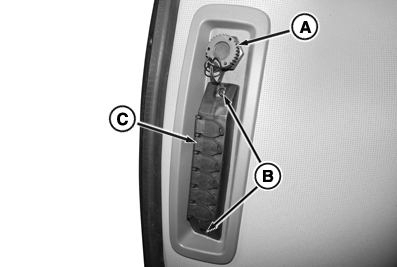
RXA0140811-UN-31MAR14 -
Remove retaining screws (B) and remove auxiliary power strip (C) (if equipped) with cover plate.
-
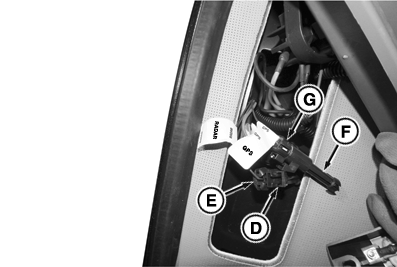
Inside right-hand console locate one wire lead marked radar and one marked GPS.
-
RXA0140812-UN-31MAR14
On tractors equipped with radar, disconnect tractor harness connector (D) from radar connector (E). Then, proceed to step 6.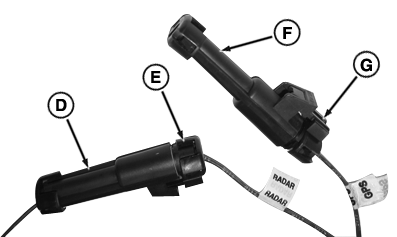
RXA0140813-UN-31MAR14 -
On tractors not equipped with radar, locate wire lead marked GPS and proceed to step 6.
-
Remove dust cap (F) from GPS connector (G).
-
Attach GPS connector to tractor harness connector.
-
Install (or leave installed) dust cap on radar connector
-
Reinstall auxiliary power strip with cover plate.
-
Reinstall diagnostic connector through cover, install cap tether and tighten nut.
-
Reinstall power strip cover retaining screws and attach diagnostic connector cap.
To connect from GPS to radar input, disconnect GPS connector and reconnect radar connector. To perform radar calibration, refer to Maintenance & Calibrations in CommandCenter™ section of this Operator’s Manual.
|
CommandCenter is a trademark of Deere & Company |
TS36762,0000257-19-20171002 |