STOP and Service Alert Indicators
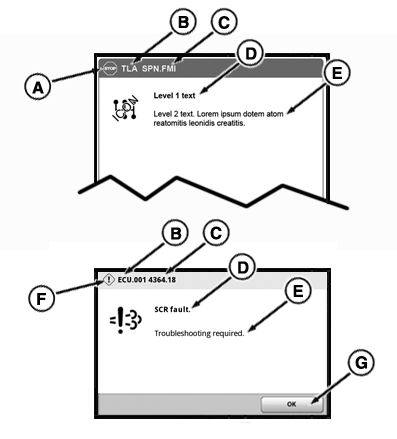
All STOP and Service Alert Indicators are accompanied by an informative message, diagnostic trouble code, and/or fault description shown on CommandCenter™.
RXA0137743-UN-11DEC13
Engine will shut down automatically if STOP signal is received when operator is out of the seat for longer than 3 seconds and the transmission control is in PARK. CommandCenter™ display can be reset by cycling key switch.
If situation allows to stop operations immediately, reduce engine speed to idle, then shut down engine and turn key ON to observe CommandCenter™ display for problem identification and solution. It may be necessary to access the stored codes, see Using Diagnostics, Stored Codes and CAN Statistics. Correct problem before restarting.
Service Alert Indicator (F): Light flashes and alarm sounds five times indicating a performance or operational problem has been detected, which must be resolved as soon as possible. Some Service Alert Indicators can be ”acknowledged” and cleared by pressing OK button (G) CommandCenter™ display. If condition still exists, diagnostic trouble code may reappear later. Continued operations can cause a Service Alert to escalate into a STOP indicator. If appropriate corrective action is not taken soon (serviced, repaired, operated in a different manner), a significant reduction in performance and/or damage to machine will occur.
When Service Alert Indicator is displayed, place tractor in park and shut off engine.
Follow solution on CommandCenter™ or if situation cannot be corrected contact your John Deere dealer.
|
CommandCenter is a trademark of Deere & Company |
TS36762,0000281-19-20170705 |