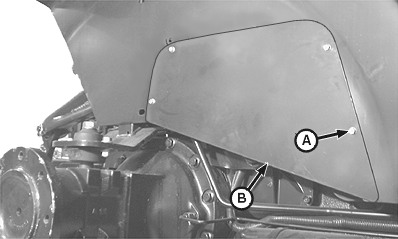
Adjusting Rockshaft Control Lever Friction-CabIf rockshaft position control lever or draft control lever do not stay in set position, increase lever friction. 1. Remove right-hand side rear wheel.2. Remove cap screws (A) and access panel (B).
|
|
AG,OUO1043,222 -19-19NOV03-1/2 |
|
3.
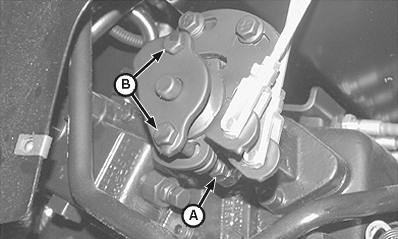
Loosen jam nuts (A).
4. Turn adjusting cap screws (B) clockwise to increase friction, counterclockwise to decrease friction. Turn cap screws equal number of turns. 5. Tighten jam nuts (A) after adjustment is complete. 6. Install access panel and cap screws. 7. Install rear wheel. Tighten cap screws to specification. Specification
|
|
AG,OUO1043,222 -19-19NOV03-2/2 |