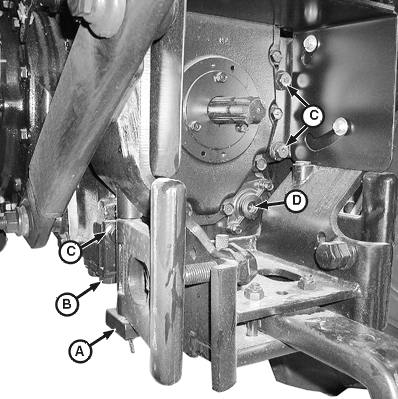
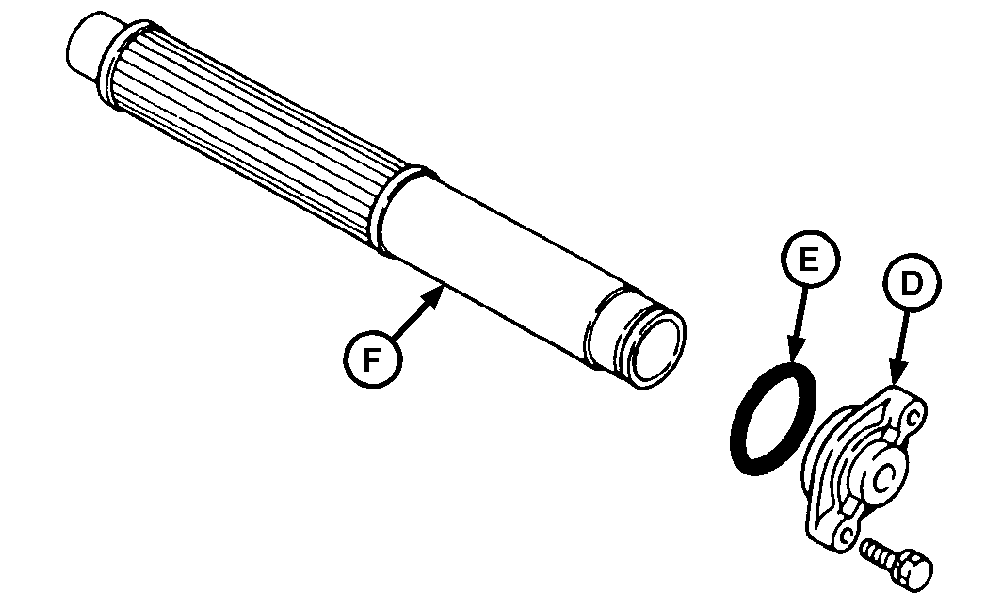
Clean Transmission-Hydraulic Pickup ScreenNOTE: Hitch arms are in raised position for clarity of photo. 1. Drain transmission-hydraulic oil. (See Change Transmission-Hydraulic Oil and Filter in this section.) 2. Remove cap screws (B) (drawbar support-to-bottom of differential housing). 3. Remove cap screws (C) (drawbar suppport-to-back of differential housing) and drawbar support (A). 4. Remove cap screws, pickup screen cover (D), O-ring (E), and pickup screen (F). Examine pickup screen for damage; replace if necessary. Clean pickup screen in solvent and blow dry with compressed air. 5. Install pickup screen so the front of pickup screen is inserted in hole at the front of differential case, as shown. 6. Install O-ring, pickup screen cover and cap screws. 7. Install drawbar support and cap screws. Tighten cap screws to specification. Specification
8. Refill system with transmission-hydraulic oil. (See Change Transmission-Hydraulic Oil and Filter in this section.) 9. Check oil level at dipstick after filling, and again after operating for five minutes. |
|
AG,OUO1043,315 -19-19NOV03-1/1 |