Flushing Cooling System
 CAUTION:
TS281-UN-15APR13
Explosive Release
Explosive release of fluids from pressurized cooling system can cause serious burns.Shut off engine. Remove filler cap only when cool enough to touch with bare hands. Slowly loosen cap to first stop to relieve pressure before removing completely.
For maximum cooling system efficiency, drain old coolant, flush the entire system, reinstall thermostats, and fill with recommended clean coolant.
-
Pressure test entire cooling system and pressure cap if not previously done. (See PRESSURE TESTING COOLING SYSTEM, earlier in this section.)
-
Slowly open the engine cooling system filler cap or radiator cap to relieve pressure and allow coolant to drain faster.
-
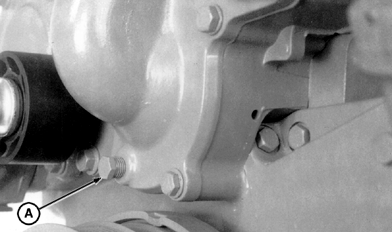
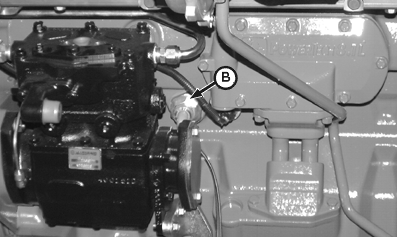
RG7675A-UN-05DEC97Water Pump Drain Plug (HFN01 Engine Shown)
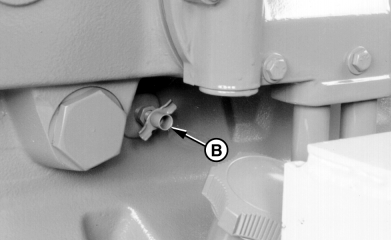
RG7143-UN-26NOV97Block Drain Valve (HFN01 Engine Shown)
A - Drain Plug
B - Block Drain Valve
On HFN01 and HFN03 engines: Open drain valve (B) on left side of engine and remove plug (A) on water pump. Drain all coolant from engine block. -
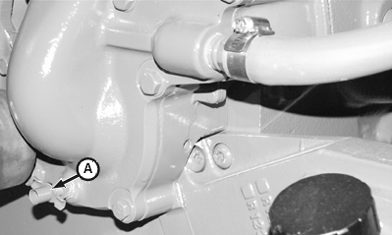
RG10701B-UN-03MAR00Drain Valve (HFN02 Engine)
RG10734A-UN-11MAY00Engine Block Heater (HFN02 Engine)
A - Drain Valve
B - Block Heater
On HFN02 engines: Open water pump drain valve (A) on water pump and remove block heater (B) (if equipped) or plug on left side of engine. Drain all coolant from engine block. -
Open radiator drain valve and drain coolant from radiator.
-
IMPORTANT: Thermostats must be removed to allow entire cooling system to be flushed.
Remove thermostats, if not previously done. Install cover (without thermostats) and tighten cap screws to specifications.
Item Measurement Specification Thermostat Housing Cover Torque 47 N˙m (35 lb-ft) -
Close all drain valves after coolant has drained. On HFN02 engines, replace block heater or plug. Fill cooling system with clean water. Run engine about 10 minutes to stir up possible rust or sediment.
-
Stop engine and immediately drain water from system before rust and sediment settle.
-
NOTE: Use FLEETGUARD® RESTORE™ to clean silicate deposits from cooling system. Use FLEETGUARD® RESTORE PLUS™ to clean lime, clacium, corrosion, oil or other foreign material from cooling system.
After draining water, close drain valves. On HFN02 engines, inspect O-ring on block heater (B) or plug for damage and replace as necessary. Fill the cooling system with clean water and TY15979 John Deere Heavy Duty Cooling System Cleaner, or an equivalent cleaner such as FLEETGUARD®, RESTORE™ or RESTORE PLUS™. Follow manufacturer's instructions on cleaner label.
-
After cleaning the cooling system, drain cleaner and fill with water to flush the system. Run engine about 10 minutes, then drain out flushing water.
-
Close all drain valves on engine and radiator.
-
Remove cap screws and remove thermostat cover.
-
Install thermostats using a new gasket. Tighten cover cap screws to specifications.
Item Measurement Specification Thermostat Housing Cover Torque 47 N˙m (35 lb-ft) -
IMPORTANT: Air must be expelled from cooling system when system is refilled. Loosen plug in side of thermostat housing to allow air to escape when filling system. Retighten plug when all air has been expelled.
Fill cooling system with coolant until coolant touches bottom of filler neck. (See ADDING COOLANT, in Service as Required Section.)
-
Run engine until it reaches operating temperature. This mixes the solution uniformly and circulates it through the entire system. The normal engine coolant temperature range is 89°—100°C (192°—212°F).
-
After running engine, check coolant level and check entire cooling system for leaks.
|
FLEETGUARD is a registered trademark of Cummins Engine Company, Inc RESTORE is a trademark of Fleetguard Inc. RESTORE PLUS is a trademark of Fleetguard Inc. |
DPSG,OUOE003,3560-19-19990612 |