PV480 Diagnostic Gauge — Main Menu
NOTE: The engine does not need to be running to navigate the diagnostic gauge screens.
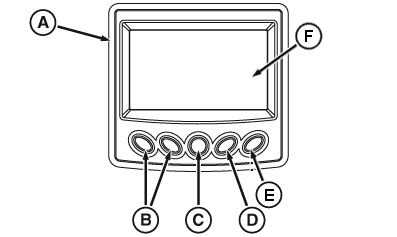
RG23474-UN-06JUN13
PV480 Diagnostic Gauge
A - Diagnostic Gauge
B - Arrow Key (2 used)
C - Menu Key
D - Select Key
E - Exit Key
F - Display
The main menu is the starting point in accessing engine information and configuring the diagnostic gauge. Press the menu key (C) to access the main menu.
- User Settings
- Faults
- Exhaust Filter
- Start Options
- Service
- Utilities
Use the arrow keys (B) and select key (D) to view menu items displayed:
Listed are examples of features available in main menu items.
In User Settings:
- Date
- Time
- Language
- Units
- Brightness
- Ambient Light
In Check Faults:
- ActiveDTCs
- Stored DTCs
In Exhaust Filter:
- Status
- Auto exhaust filter clean
- Disable exhaust filter clean
- Request exhaust filter clean
In Start Options:
- Auto features
- Manual features
- Clock start
- Temperature start
In Service:
- Data list screens
- Engine hours
- Data logger
- Service reminders
- Harness diagnostics
- Component identification
In Utilities:
- System settings
- Pressure governing
- ECU software update
- Advanced settings (password protected)
|
BL90236,0000001-19-20210819 |