DG14 Diagnostic Gauge — Main Menu
NOTE: The engine does not need to be running to navigate the diagnostic gauge menu screens.
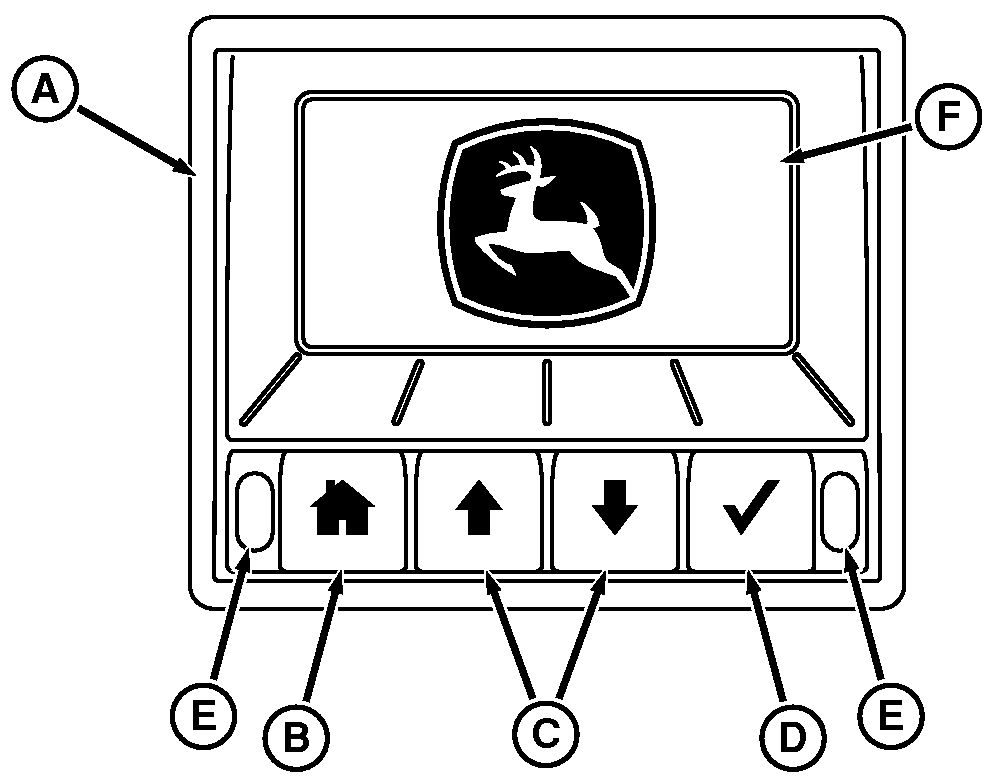
RG27904-UN-25FEB16
Diagnostic Gauge
A - Diagnostic Gauge
B - Home Menu Key
C - Arrow Key (2 used)
D - Check Mark Select Key
E - Indicator Light (2 used)
F - Display
The main menu is the starting point in accessing engine information and configuring the diagnostic gauge. Press the home menu key (B) to access the main menu.
- Function
- Display
- Utility
- Setup
Use the arrow keys (C) and select key (D) to view menu items displayed:
Listed are examples of features available in main menu items.
In Function:
- View DTC
- Reset trip (FT4 Only)
- Exhaust regeneration (IT4 & FT4 Only)
- ECU software updates
In Display:
- Adjust backlight
- Adjust indicator brightness
- Display option setup
In Utility:
- Full parameter list
- Software data
- Select units
- Select language
In Setup:
- Select analog input
- Select digital input
- Select digital output
- Alarm functionality
- Add J1939 gauge
- Set RS485 messaging
- Set engine source address
- Set function instance
- Harness diagnostics
- TSC control (password protected)
Key Code for Password Protected Screens
Numeric values are assigned to keys on diagnostic gauge as identified below:
- 1 — Home Menu Key
- 2 — Up Arrow Key
- 3 — Down Arrow Key
- 4 — Check Mark Select Key
|
BL90236,0000029-19-20210819 |