PV101 Diagnostic Gauge — Using
RG13132-UN-09SEP03
Diagnostic Gauge
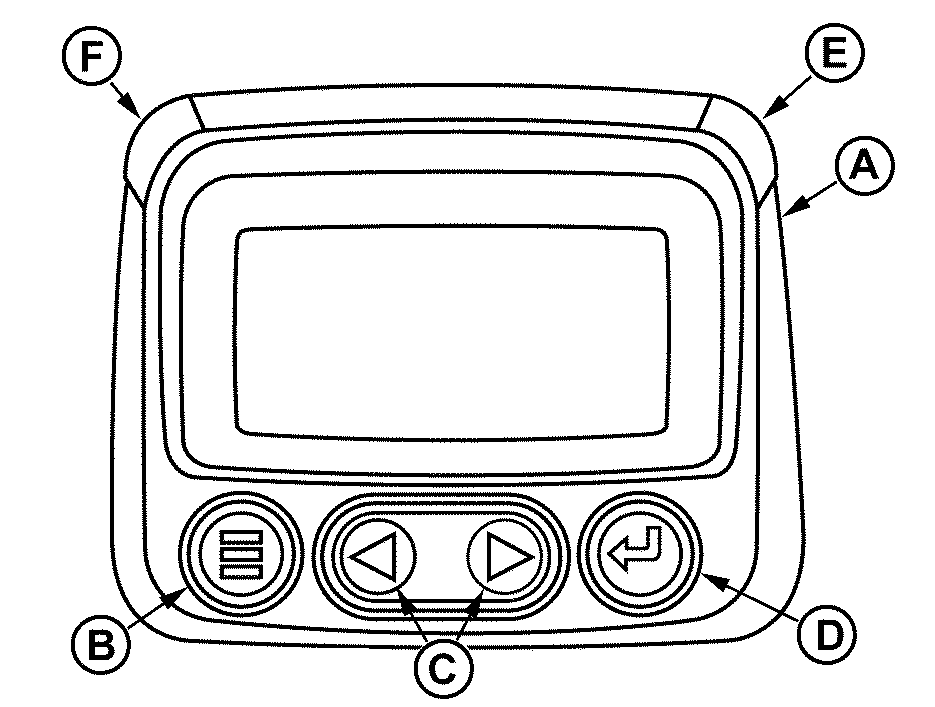
A - Diagnostic Gauge
B - Menu Key
C - Arrow Keys
D - Enter Key
E - Red “STOP ENGINE” Indicator Light
F - Amber “WARNING” Indicator Light
The diagnostic gauge (A) allows the operator to monitor engine functions, view diagnostic trouble codes (DTCs), and perform preliminary diagnostics. The gauge is linked to the electronic control system and sensors.
The menu key (B) allows the operator to access the main menu of the diagnostic gauge. For more information see PV101 Diagnostic Gauge — Main Menu in Section 15. This key also allows the operator to cancel an option and go back to the previous menu or home menu.
The arrow keys (C) allows the operator to scroll between menu items. The arrow keys automatically change from up and down, to left and right depending on the menu item to be selected.
The enter key (D) allows the operator to access menu items selected by the arrow keys (C) and confirm changes made by the operator.
The red “STOP ENGINE” indicator light (E) allows the operator to visually see when a condition exists which requires immediate operator action and service.
The amber “WARNING” indicator light (F) allows the operator to visually see when a condition exists which requires operator action.
|
BL90236,000002A-19-20210816 |