Setting up your display for the first time
The guidelines presented below are intended for setting up the display for the first time. Once the configuration is set up, there is no need to revisit or change any of the settings.
NOTE: If you require assistance during the set up process, contact your nearest Murphy customer support representative.
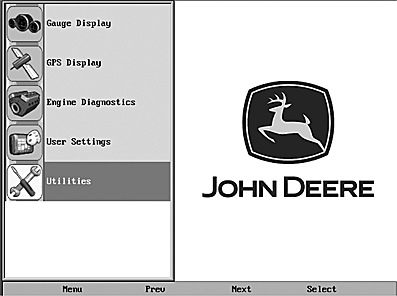
RG17604-UN-08SEP09
1. At the main menu, press the Next button to move the highlight bar through the options until Utilities is highlighted.
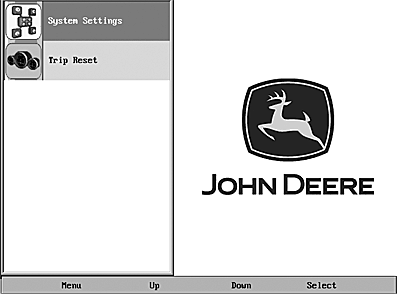
RG17605-UN-08SEP09
2. Press Select. The Utilities sub-menu is displayed.
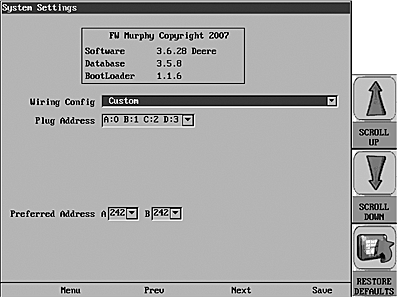
RG17606-UN-08SEP09
3. From the Utilities sub-menu, select System Settings. The following screen is displayed.
4. With the cursor highlighting the Wiring Config field, press the Scroll Up or Scroll Down virtual buttons (located to the right of the display), to scroll through the list of options.
The following table indicates the proper system settings for each kit by installation type.
|
Kit Type |
Installation Type |
System Settings |
|
Single engine, main station, 12/24 volts |
Main station HelmView |
Engine(s) - Single Harness to Plug A-Port, Stbd |
|
Single engine, flybridge, 12 volts |
Main station HelmView |
Engine(s) - Single Harness to Plug A-Port, Stb |
|
Flybridge HelmView |
Engine(s) - Single Harness to Plug A-Port, Stbd |
|
|
Dual engine, main station, 12/24 volts |
Main station HelmView |
Engines - Dual harness to Plug A&B-Port, Stbd |
|
Dual engine, flybridge, 12 volts |
Main station HelmView |
Engines - Dual Harness to Plug A&B-Port, Stbd |
|
Flybridge HelmView |
Engines - Dual Harness to Plug A&B-Port, Stbd |
|
|
Single engine, flybridge, 24 volts |
Main station HelmView |
Engine(s) - Single Harness to Plug A-Port, Stbd |
|
Flybridge HelmView |
Engine(s) - Single Harness to Plug A-Port Stbd |
|
|
Dual engine, flybridge, 24 volts |
Main station HelmView |
Engines - Dual Harness to Plug A&B-Port, Stbd |
|
Flybridge HelmView |
Engines - Dual Harness to Plug A&B-Port, Stbd |
NOTE: When configuring dual HelmView stations as the Main station and Flybridge, the Preferred Addresses must be different.
NOTE: This setting needs to match the wiring configuration for how your display was installed. Refer to the “Wiring Instructions” section of the “John Deere HelmView Model Installation Manual” for the associated wiring diagrams for each of these options.
Once the System Settings have been configured, you may want to set up your display options and favorites. For information on this process, refer to the User Setting section located in this manual.
|
JR74534,00002BD-19-20090923 |