Reprogramming the Display
RG17623-UN-08SEP09
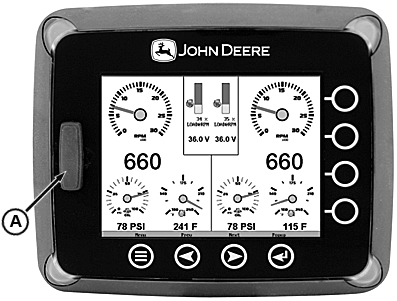
A - SD Card Slot and Cover
The SD card slot on the front of the unit is used for reprogramming the unit.
If you have been asked to create the card to reprogram the unit, you should:
- Insert card into reader/writer. SD card must be 1 gigabyte or smaller.
- Unzip the file provided into a directory on the PC.
- Format the card to erase all current files residing on the card.
- Copy all of the files in the directory to the SD card. Copy only the files to the card, not the directory or the zip file.
- Remove card and place into display for programming.
The following steps guide you through using the SD card slot to reprogram your HelmView unit.
- Turn off power to the display.
- Carefully remove the slot cover.
- Insert the SD card into the slot until it locks in.
- The power should be turned on.
- A screen will appear prompting you to reprogram the unit. Select “INSTALL” to continue. It will take about 6-8 minutes to reprogram the unit.
- When done, remove the card from the slot and replace the cover.
- Restart the power. The new software should be installed and available.
|
JR74534,00002BF-19-20090901 |