PV101 Instrument Panels
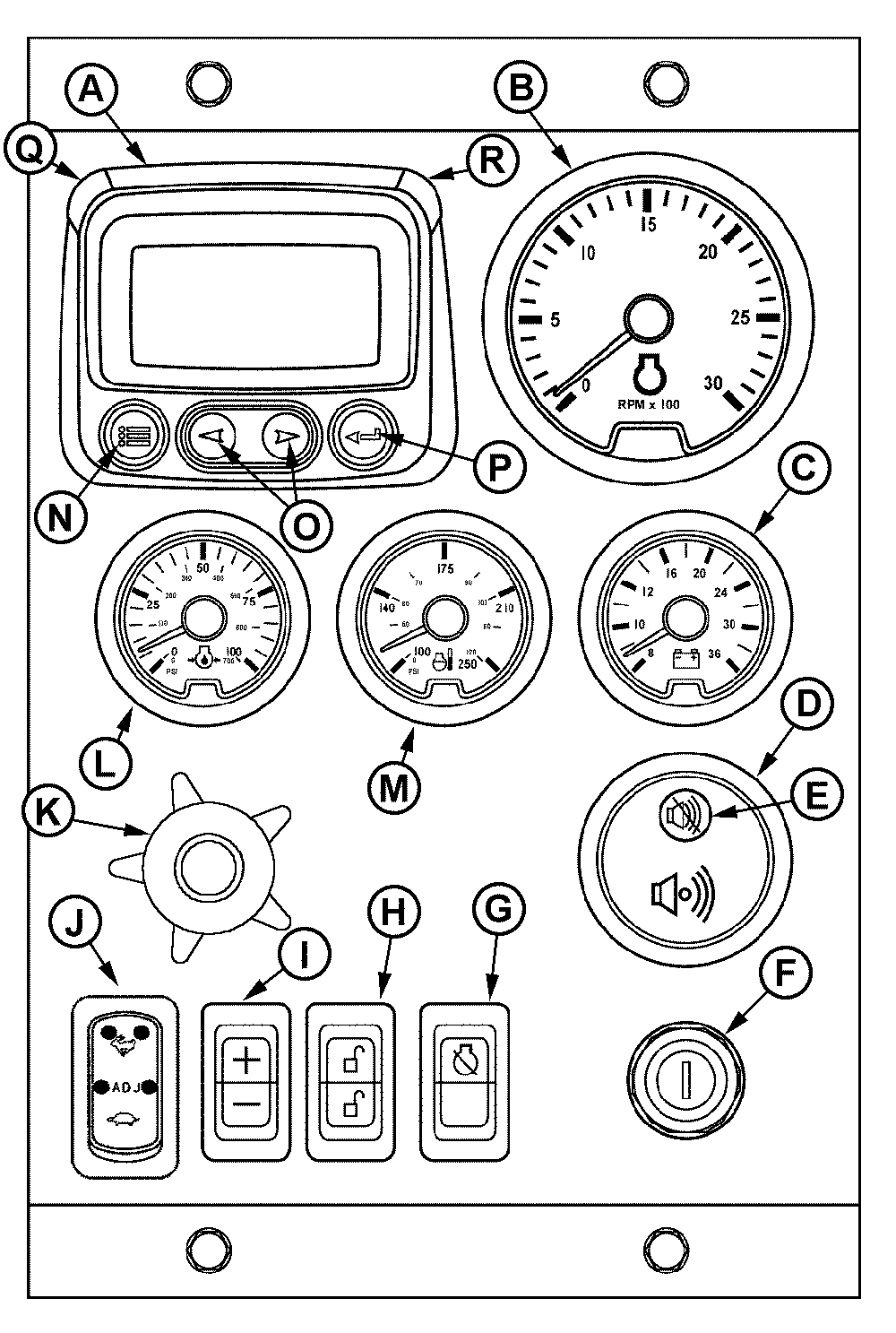
RG13276-UN-28OCT03
Full-Featured Instrument Panel
A - Diagnostic Gauge/Hour Meter
B - Tachometer
C - Voltmeter (Optional)
D - Audible Alarm (Optional)
E - Audible Alarm Override Button
F - Key Switch
G - Override Shutdown Rocker Switch
H - Bump Enable Rocker Switch
I - Speed Select Rocker Switch
J - High-Low Speed Select Rocker Switch
K - Analog Throttle Control (Optional)
L - Oil Pressure Gauge
M - Coolant Temperature Gauge
N - Menu Key
O - Arrow Key (2 used)
P - Enter Key
Q - Amber “WARNING” Indicator Light
R - Red “STOP ENGINE” Indicator Light
Interim tier 4 / Stage III B John Deere PowerTech OEM Engines have an electronic control system, which has the following controls and gauges as shown. The following information applies only to those controls and gauges supplied by John Deere. Refer to your engine application manual for specific guidelines if John Deere-sourced controls and instrumentation are not used.NOTE: This manual only covers operation of engine with a John Deere control system.
Following is a brief description of the available optional electronic controls and gauges found on John Deere provided instrument panels. Refer to manufacturer’s literature for information on controls not provided by Deere.
A—Diagnostic Gauge/Hour Meter
The diagnostic gauge (A) displays diagnostic trouble codes (DTCs) as they are accessed. Other information on the engine can be accessed using the touch keys (N, O, and P). The hour meter feature shows the operating hours of the engine and should be used as a guide for scheduling periodic maintenance. If the diagnostic gauge receives a trouble code from an engine control unit, the current display will switch to a warning or shutdown (depending on the severity of the code) screen that will display the trouble code number, the description of the code and the corrective action needed.
B—Tachometer
The tachometer (B) indicates engine speed in hundreds of revolutions per minute (rpm).C—Voltmeter (Optional)
The voltmeter (C) indicates system battery voltage. The amber “Warning” light (Q) will illuminate when battery voltage is too low for proper operation of the fuel injection system.
D—Audible Alarm (Optional)
The audible alarm (D) will sound whenever low oil pressure, high coolant temperature, or water-in-fuel conditions exist. This includes all signals that light up the amber “WARNING” indicator (intermittent alarm) or the red “STOP ENGINE” indicator (steady alarm).
E—Audible Alarm Override Button
The optional audible alarm has an override button (E) that silences the audible alarm for approximately two minutes when pressed.
F—Key Start Switch
The three-position key start switch (F) controls the engine electrical system. From the “OFF” position when the key switch is turned clockwise to “START”, the engine will crank. When the engine starts, the key is released and returns to the “ON” (RUN) position.
G—Override Shutdown Rocker Switch
Switch will be present, but may not be active, depending on engine control unit (ECU) options originally selected. If switch is active, pressing the upper half of the override shutdown switch (G) will override an engine shutdown signal. The switch must be pressed within 30 seconds to prevent undesired shutdown of engine. Pressing this switch will override the ECU engine shutdown command for 30 seconds at a time to move vehicle to a safe location.
H—Bump Speed Enable Rocker Switch
This is a three-position switch (H) with the center position as “OFF” (locked). With this switch in the “OFF” position, the speed select switch (I) is also locked, to prevent accidental changes in operating speed. Pressing upper or lower half of switch (H) will unlock or enable the bump speed switch to take effect using speed select switch (I).
I—Speed Select Rocker Switch
The speed select switch (I) is used to bump engine speed up (+) or down (-) in small increments during operation. This switch must be used with the bump speed enable switch (H) in the unlocked position (top or bottom half of button depressed).
J—High-Low Speed Select Rocker Switch
The high-low speed select switch (J) is used to set the engine operating speeds at slow (turtle) or fast (rabbit). Factory preset idle speeds can also be adjusted using bump speed enable switch (H) with speed select switch (I).
The basic instrument panel will have the high-low speed select switch only. Press and hold up (+) or down (-) to adjust engine speed as desired. The engine speed selected will not be held in the memory. To adjust engine speeds, See Changing Engine Speeds in Section 20.
How To Select Preset Operating Speeds (Bump Speeds)
First select “Turtle” (slow) or “Adj” by pressing speed select switch (J) to “Turtle” (slow) or “Adj”(center). Then you can press either the upper or lower portion of the bump speed enable switch (H) to unlock the setting. The bump speed enable must be held down as the speed select switch (J) is used to change the setting by pressing (+) to increase speed or (-) to decrease speed.
Once the slow idle speed has been set, the bump speed enable switch must be pressed and released three times within two seconds to commit the new operating speed to memory. If not done, the engine's new speed will only be effective until the key switch is shut off. Then the speed will revert back to the previous setting.
The fast idle speed is not adjustable. It will always go back to the factory preset fast idle speed.
K—Analog Throttle Control (Optional)
The throttle control (K) is used to control engine speed. This control is available only on engines with analog throttle.
L—Engine Oil Pressure Gauge
The oil pressure gauge (L) indicates engine oil pressure. An audible alarm (D) warns the operator if engine oil pressure falls below a safe operating pressure.
M—Engine Coolant Temperature Gauge
The engine coolant temperature gauge (M) indicates engine coolant temperature. An audible alarm (D) warns the operator if coolant temperature rises above the preset safe operating temperature.
N—Menu Key
The menu key is pressed to either enter or exit the menu screens on the diagnostic gauge (A).
O—Arrow Keys
Use the arrow keys (O) to change the display on the window of the diagnostic gauge (A) and to access engine performance data.
Pressing the left arrow to scroll to the left or upward or the right arrow to scroll to the right or downward. This will allow you to view various engine parameters and any diagnostic trouble codes that occur.
Refer to the following procedure for accessing engine information on the diagnostic gauge using the touch keys.
P—Enter Key
The enter key (P) is pressed to select the parameter that is highlighted on the screen.
Q—Amber “WARNING” Indicator Light
When light is illuminated, an abnormal condition exists. It is not necessary to shut down the engine immediately, but the problem should be corrected as soon as possible.
R—Red “STOP ENGINE” Indicator Light
When light is illuminated, stop engine immediately or as soon as safely possible to prevent engine damage. Correct problem before restarting.
|
JR74534,00002C7-19-20210816 |