PV101 Diagnostic Gauge — Main Menu
NOTE: The engine does not need to be running to navigate the diagnostic gauge screens.
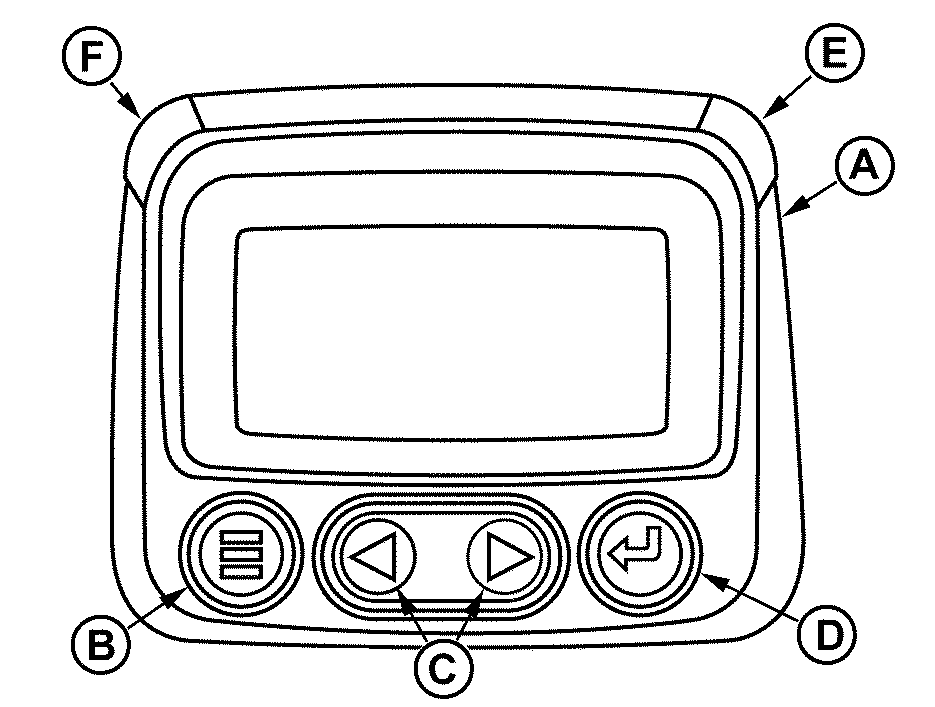
RG13132-UN-09SEP03
Diagnostic Gauge
A - Diagnostic Gauge
B - Menu Key
C - Arrow Key (2 used)
D - Enter Key
E - Red “STOP ENGINE” Indicator Light
F - Amber “WARNING” Indicator Light
The main menu is the starting point in accessing engine information and configuring the diagnostic gauge. Press the menu key (B) to access the main menu.
- Go to 4-up dislpay
- Exhaust filter
- Engine speed control
- Languages
- Stored codes
- Engine configuration
- Setup 1-up display
- Setup 4-up display
- Select units
- Adjust backlight
- Adjust contrast
- Utilities
Use the arrow keys (C) and enter key (D) to view menu items displayed:
Listed are examples of features available in main menu items.
In Utilities:
- Gauge data
- Remove all gauges
- Software version
- Modbus setup
- Fault conversion
- Select engine ECU
- Clear machine hours
- Performance data
- Interactive tests
- Reset trip
- Set function instance
- ECU software update
|
JR74534,00002C8-19-20210816 |