Instrument Panel Method for Retrieving Diagnostic Trouble Codes
RG13740-UN-11NOV04
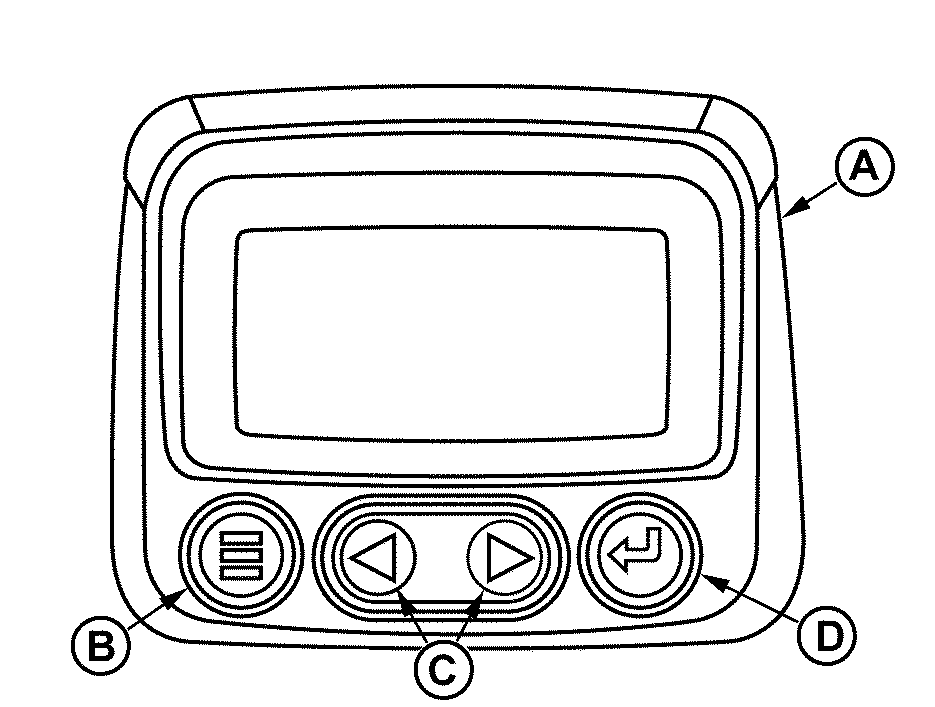
Trouble Code Display On Instrument Panel
A - Diagnostic Gauge
B - Menu Key
C - Arrow Keys
D - Enter Key
IMPORTANT: Care should be used during diagnostic procedures to avoid damaging the terminals of connectors, sensors, and actuators. Probes should not be poked into or around the terminals or damage will result. Probes should only be touched against the terminals to make measurements.
Diagnosis of the Deere electronic control system on engines with Deere electronic instrument panel should be performed as follows:
1. Make sure all engine mechanical and other systems not related to the electronic control system are operating properly. (See ENGINE TROUBLESHOOTING later in this section.)
NOTE: Diagnostic gauge (A) uses the menu key (B) to access various engine functions, two arrow keys (C) to scroll through the engine parameter list and view the menu list, and an enter key (D) for selecting highlighted items.
2. Read and record DTC(s) displayed on LCD of diagnostic gauge (A). For procedure to access diagnostic trouble codes, refer to “Using Diagnostic Gauge to Access Engine Information”, earlier in this manual.
3. Go to the LISTING OF DIAGNOSTIC TROUBLE CODES (DTCs) later in this section, to interpret to the DTC(s) present.
4. Contact your nearest engine distributor or servicing dealer with a list of DTC(s) so that necessary repairs can be made.
|
OURGP11,0000063-19-20051208 |