Changing Engine Speed
RG13725-UN-11NOV04
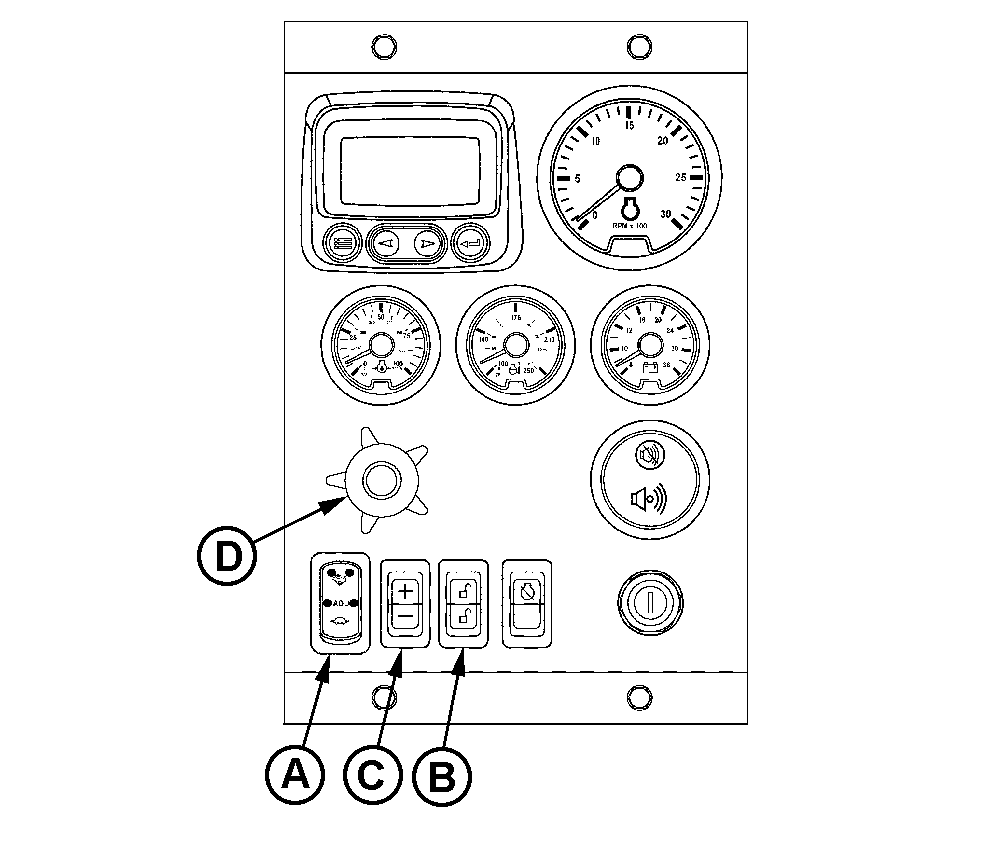
Changing Engine Speed with Full-Featured Panel
A - High-Low Speed Select Rocker Switch
B - Bump Speed Enable Rocker Switch
C - Speed Select Rocker Switch
D - Analog Throttle Control (Optional)
Changing from slow to fast speed using Adjustable High-Low Speed Select Rocker Switch (A)
Engine panels have an adjustable three-position rocker switch (A) that can be used to select slow idle, fast idle, or an adjustable (“ADJ”) intermediate speed.
- For slow speed, press lower half of rocker switch (indicated by turtle symbol).
- For fast speed, press upper half of rocker switch (indicated by rabbit symbol).
NOTE: To adjust preset fast or slow speeds with adjustable High-Low Speed Select Rocker Switch:
- Select middle position (ADJ) or slow (turtle) position on the optional Adjustable Three-State Speed Select Rocker Switch (A).
- Press and hold top or bottom half of Bump Speed Enable Rocker Switch (B) while using Speed Select Rocker Switch (C).
- Use Speed Select Rocker Switch (C) to bump engine speed up (+) or down (-).
NOTE: Slow (turtle) position is factory preset at low engine idle, while middle (ADJ) position is factory set at high engine idle.
NOTE: Once the speed has been set, the Bump Speed Enable Switch (B) must be pressed and released three times within two seconds to commit the new slow or fast speed to memory. If not done, the engine's new slow or fast speed will only be effective until the key is shut off. Then the speed will revert to its previous setting.
Changing engine speed using optional analog throttle (D)
NOTE: Pushing in on analog throttle will immediately take engine to slow idle speed.
1. Set High-Low Speed Select Rocker Switch (A) to low speed “turtle” position.
2. Turn analog throttle (D) clockwise to increase speed or counterclockwise to decrease speed.
NOTE: Engine Control Unit (ECU) reads the higher of the High-Low Speed Select Rocker Switch or the Analog Throttle(s) Speed Settings. With High-Low switch at low speed, Analog Throttle(s) will control speed higher than low idle setting.
Changing engine speeds on engines equipped with the Basic Instrument Panel
RG13289-UN-30OCT03
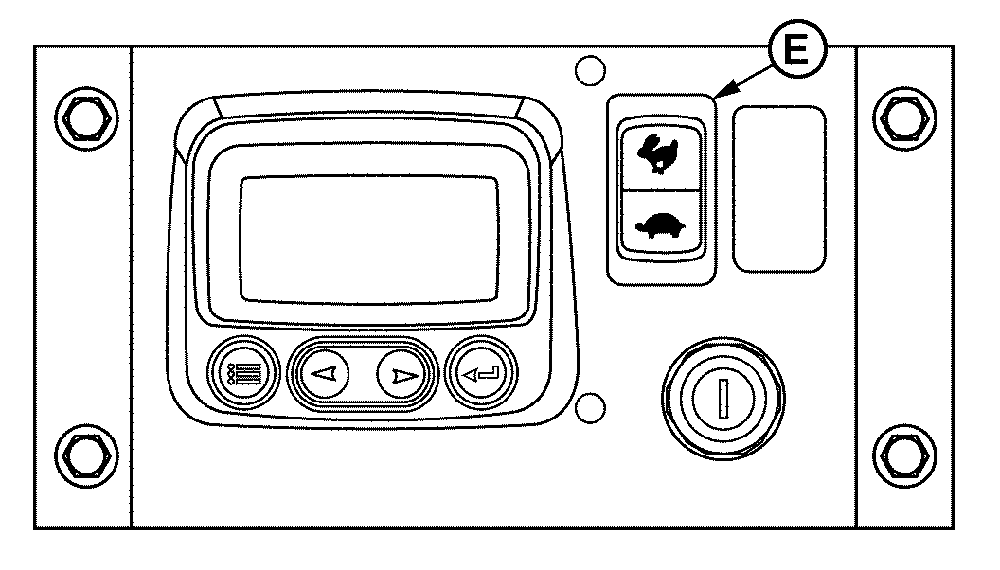
Changing Engine Speed With Basic Panel
E - High-Low Speed Select Rocker Switch
The basic instrument panel has a “ramp” throttle switch (E) with a spring loaded return to the center rest position (Off).
To increase the engine speed, press and hold upper half of rocker switch (E) (indicated by rabbit symbol) to increase or ramp up the engine speed to desired speed. Release the rocker switch.
Press lower half of rocker switch (indicated by turtle symbol) to decrease or ramp down the engine speed to desired speed. Release the rocker switch.
The settings will not be stored, so above steps must be repeated for each speed change.
|
OURGP12,000008A-19-20040922 |