Replacing Air Cleaner Filter Elements
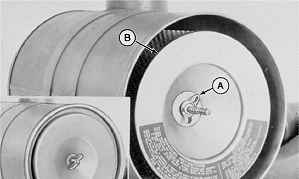
RG4686-UN-20DEC88
Air Cleaner Primary Element
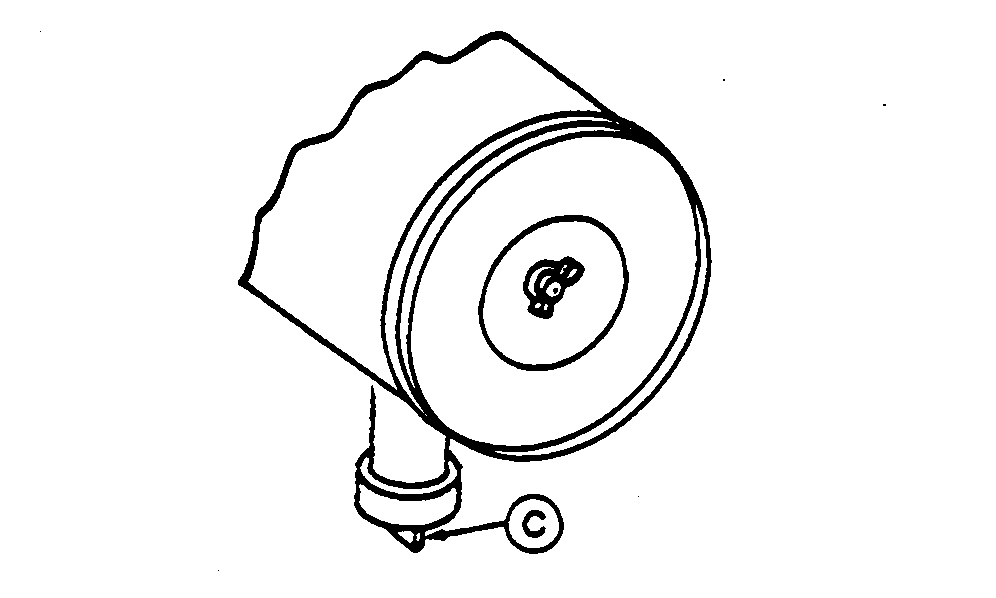
RG4687-UN-20DEC88
Dust Unloader Valve
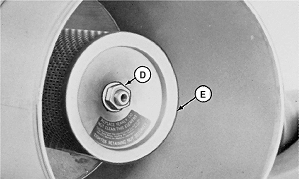
RG11068-UN-26JUN00
Air Cleaner Secondary Element
A - Wing Nut
B - Primary Element
C - Unloader Valve
D - Retaining Nut
E - Secondary Element
IMPORTANT: ALWAYS REPLACE primary air cleaner element when air filter restriction indicator shows a vacuum of 625 mm (25 in.) H2O, is torn, or visibly dirty.
NOTE: This procedure applies to John Deere air cleaner kits. Refer to manufacturers' instructions for servicing air cleaners not supplied by John Deere.
1. Remove wing nut and remove canister cover shown in small illustration inset.
2. Remove wing nut (A) and remove primary element (B) from canister.
3. Thoroughly clean all dirt from inside canister.
NOTE: Some engines may have a dust unloader valve (C) on the air cleaner. If equipped, squeeze valve tip to release any trapped dirt particles.
IMPORTANT: Remove secondary (safety) element (E) ONLY for replacement. DO NOT attempt to clean, wash, or reuse secondary element. Replacement of secondary element is usually necessary ONLY when primary element has a hole in it or when the element is not properly seated.
4. To replace secondary element, remove retaining nut (D) and secondary element (E). Immediately replace secondary element (E) with new element to prevent dust from entering air intake system.
5. Install new primary element (B) and tighten wing nut (A) securely. Install cover assembly and tighten retaining wing nut (D) securely.
IMPORTANT: Whenever the air cleaner has been serviced or had cover removed, ALWAYS fully depress the air filter restriction indicator reset button (if equipped) to assure accurate readings.
6. If equipped, fully depress air filter restriction indicator reset button and release to reset indicator.
|
RK80614,000003C-19-20130510 |