Settings
NOTE: Initial settings are preferred to be done by dealer only.
Basic Settings
PY25069-UN-19FEB16
PY25070-UN-18JUN15
PY25072-UN-19FEB16
Change Language
PY25073-UN-19FEB16
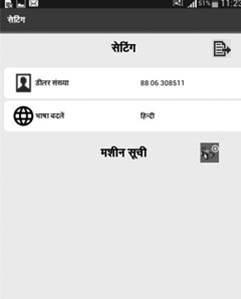
Translated Language
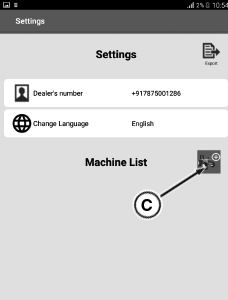
A - Dealers Number
B - Change Language
C - Add Machine Button
-
By clicking setting from main menu, application traverses to setting screen.
NOTE: Setting menu displays the English as the default language.
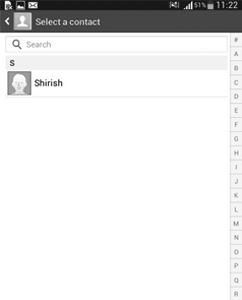
IMPORTANT: Before adding the dealers mobile number, make sure that dealers contact number saved in mobile contacts, otherwise it shows error when adding the contact.
-
By clicking the import contact the setting screen navigates to the phone contact list as shown, add the dealers numbers from contact numbers from mobile contact list.
-
IMPORTANT: Before adding the machine list, make sure that dealers mobile number has been added, otherwise it gives the error
Click on add machine button (C) to add the machine numbers.
-
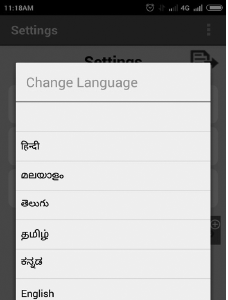
Click the change language option (B), a pop-up displays the list of languages present. By selecting any language from the list current page gets reloaded displaying all the text in selected language as shown.
Create Machine Profile
-
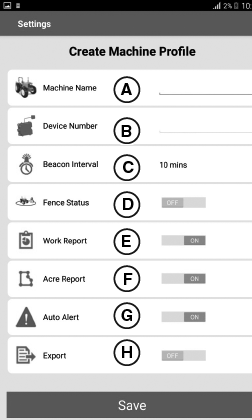
PY25074-UN-19FEB16A - Machine Name
B - Device Number
C - Beacon Interval1
D - Fence Status2
E - Work Report3
F - Acre Report4
G - Auto Alert5
H - Export6
By clicking the add machine button from setting the screen traverses to create machine profile.NOTE: Not recommended to turn ‘OFF’ auto alert.
-
NOTE: Operator can choose the machine name as per choice of the user. While adding multiple machines, ensure that duplicate machine name and device number has not added into the machine list and ensure that added 10-digit GSM Device numbers only in the machine profile. Application not allows the duplicate number and name.
PY25075-UN-19FEB16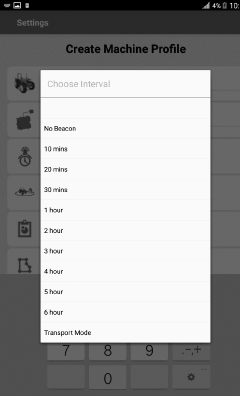
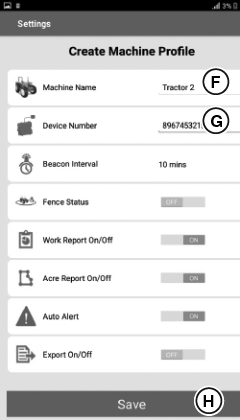
PY25076-UN-19FEB16F - Machine Name
G - Device Number
H - Save Bottom
Add the machine name (F) as per the users choice. -
Add device number (G) of the Sim card with in the telematics unit
-
NOTE: Beacon interval default value is 10 minutes and once setting the beacon interval, it is recommended that keep auto alert always ‘ON’ and fencing status “OFF” or ‘ON’with the help of toggle switch if necessary.
Beacon interval can be changed from the pop-up that appears on clicking the area in front of beacon interval button as shown.
-
Set “no beacon” option for continuous tracking of the tractor location if necessary.
-
Set “Transport Mode” option If the tractor is being towed or transported in off condition if necessary.
-
Click “Save “ button (H) for saving the changes.
-
PY25077-UN-19FEB16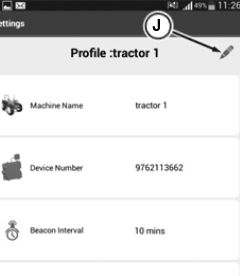
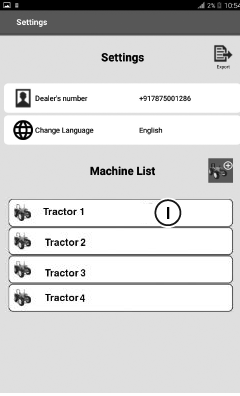
PY25078-UN-19FEB16I - Machine Icon
J - Edit Button
Click on the machine (I) icon then application traverses to edit profile. -
By clicking the edit button (J) screen is enabled to edit all the profile parameters.
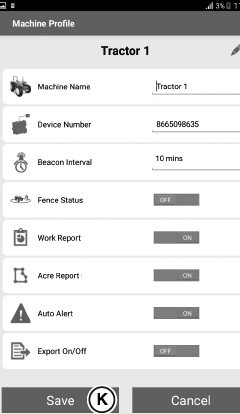
NOTE: To edit the machine profile click on the appropriate machine from the machine list. When creating the existing machine profile if the operator changes the values of these three parameters then app sends the query message to save the profile, otherwise settings are saved with default settings as shown.
-
PY25079-UN-23FEB16K - Save Button
Clicking save button (K) saves the edited changes and reports these changes to telematics device. -
On pressing the back button before the saving changes a pop- up appears on the screen, clicking ‘No’ closes the screen and clicking ‘Save’ saves the edited changes and reports these changes to telematics device.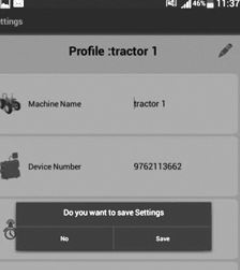
PY25081-UN-19FEB16 -
PY25080-UN-19FEB16L - Error Mark
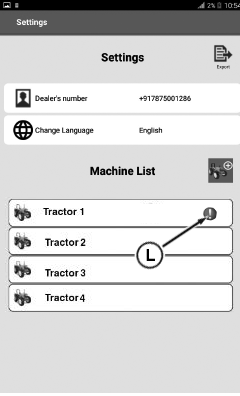
If changes are not saved then red error mark (L) appears in front of machine name in the machine list as shown. -
On pressing back button app navigates to the main screen.
|
1 If engine and ignition in
OFF condition and tractor is moving, the telematics unit checks this
condition at a time interval defines in beacon interval. If such condition
is true the telematics unit sends vehicle moving alert to the registered
mobile number.
|
HK75640,000044C-19-20221019 |