Report Menu
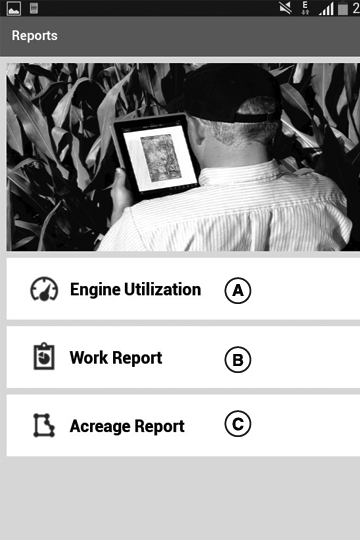
PY25103-UN-14OCT15
A - Engine Utilization
B - Work Report
C - Acreage Report
By clicking the report menu app traverses to the report screen.
Engine Utilization Report
NOTE: Engine utilization data can record into the app for seven days in case data available for all seven days otherwise shows as ‘No Data Available’.
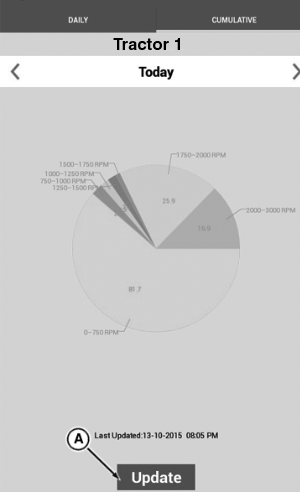
PY25106-UN-19JAN16
A - Update Button
-
Clicking engine utilization from report screen traverses to engine utilization screen.
Engine utilization report shows the details of engine operations in different RPM zones is shown.
- Engine OFF
- 0-750 RPM
- 750-1000 RPM
- 1000-1250 RPM
- 1250-1500 RPM
- 1500-1750 RPM
- 1750-2000 RPM
- 2000-3000 RPM
-
Clicking cumulative tab shows the cumulative engine utilization in the form of pie chart.
NOTE: Daily tab always default view when open the engine utilization report.
-
Clicking on update button (A) sends request for information.
-
If the values are received within time out then the pie chart updated with received values for that day.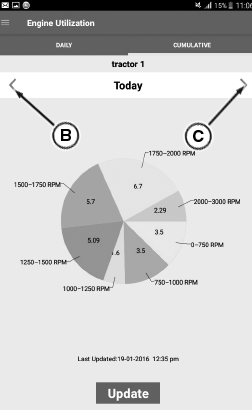
PY25109-UN-19FEB16 -
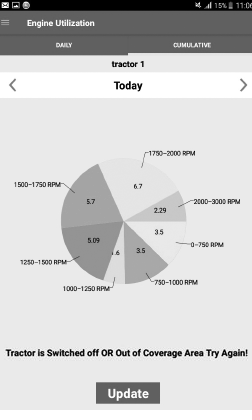
PY25108-UN-19FEB16B - Backward Arrow Button
C - Forward Arrow Button
If the values are not received within time out then shows message as ‘Tractor is switched Off or out of coverage area try again’ -
Press the backward button (B) and forward button (C)for checking the data up to seven days.
-
Press the back button to traverse to the report menu.
Work Report
NOTE: Work report data can record into the app for seven days in case data available for all seven days otherwise shows as “No Data Available”.
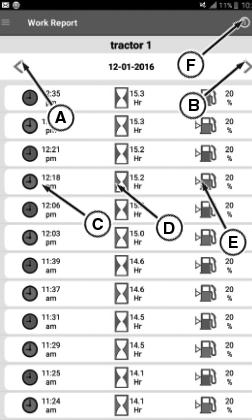
PY25111-UN-23FEB16
A - Backward Arrow Button
B - Forward Arrow Button
C - Start Stop Time
D - Hour Meter1
E - Fuel Level2
F - Information Tab
-
Clicking work report traverses to work report screen..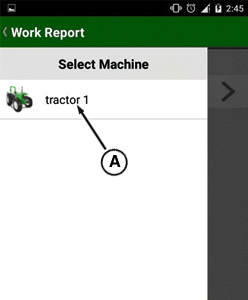
PY25110-UN-15MAR24 -
In work report indicates appropriate indications with respective colors.Green indicates start of engine and red indicates stop of engine.
-
Press the backward button (A)and forward buttons (B) for checking the data up to seven days.
-
By clicking on information tab screen displays detailed description of all work report tabs.
-
Press the back button to traverse to the report menu..
Acreage Report
NOTE: Acreage report data can record into the app for seven days in case data available for all seven days otherwise shows as “No Data Available”.
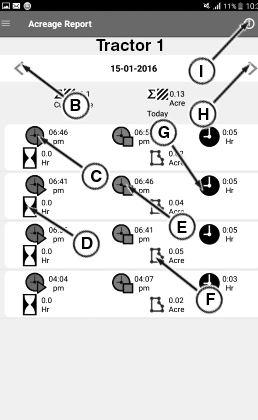
PY25113-UN-23FEB16
B - Backward Arrow Button
C - Time When acre Measurement Started
D - Engine Hours Required to Perform Operation
E - Time When acre Measurement Stop
F - Acre Measured
G - Clock Hours Required to Perform Operation
H - Forward Arrow Button
I - Information Tab
-
Clicking acreage report traverses to acreage report screen.
-
Press the backward and forward arrows (B) for checking the acreage report up to seven days.
-
By clicking on information tab screen displays detailed description of all work acreage tabs.
-
Press the back button to traverse to the report menu..
|
1 Hour meter
values when engine started and stopped.
|
HK75640,0000451-19-20181009 |