Operating Cassette Tape or Compact Disc Player—If Equipped
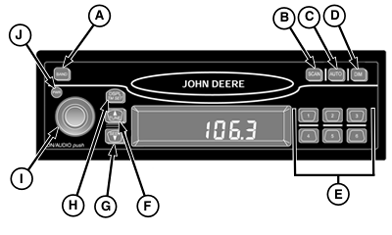
LV12461-UN-12APR05
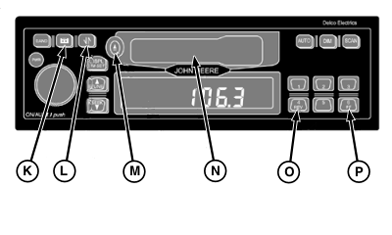
LV12462-UN-12APR05

LV12463-UN-12APR05
A - Band
B - Scan
C - Auto Preset
D - Dim
E - Preset Stations
F - Tune
G - Seek
H - Display/Time Set
I - On/Audio/Volume
J - Power
K - Tape
L - Tape Reverse
M - Eject Tape
N - Tape Slot
O - Rewind Tape
P - Fast Forward Tape
Q - Eject CD
R - Pre-Scan/Auto
S - Scan/Dim
T - CD Mode
U - CD Changer Mode
V - Alarm
W - CD Repeat
X - CD Random
Y - CD Pause
Operating cassette tape player
- Turn receiver ON.
- Insert cassette into slot (N). If radio is playing, press (K) to play the cassette.
- Press (L) to play the opposite side of the tape.
- Press (O) to rewind.
- Press (P) to fast forward.
- Press (M) to eject tape.
- If receiver detects a defective cassette, “BAD TAPE” will appear on the display and the tape will be ejected.
Operating compact disc player
- Turn ignition and receiver ON.
- Insert compact disc into slot, label side up.
- Press (F) to forward to the next track. Press (G) to reverse to the beginning of the track.
- Press (W) to repeat the current track. Press (X) for random track selection.
- Press and hold (O) to fast reverse. Release to play at normal speed.
- Press (Y) to pause the CD. Press (Y) again to resume play.
- Press and hold (P) to fast forward. Release button to play at normal speed.
- Press (Q) to eject CD.
- Press (S) to advance to the next track on the CD. The CD will play 10 seconds of that track and then play each successive track for 10 seconds. Press again to cancel.
|
AI68620,0000207-19-20100903 |