Cleaning Transmission-Hydraulic Oil Pickup Screen
-
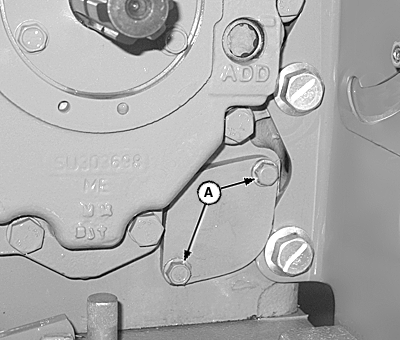
LV14259-UN-11MAY11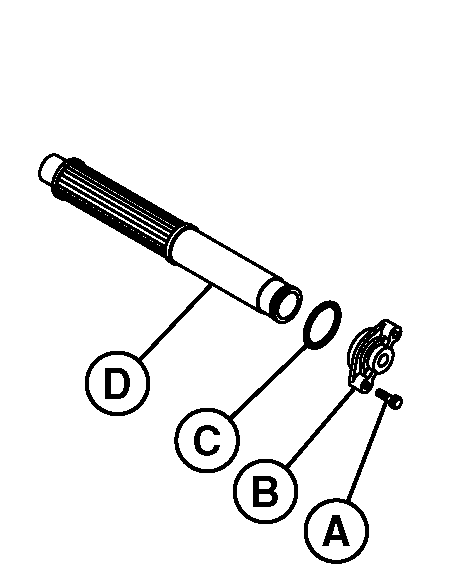
LV12562-UN-13APR05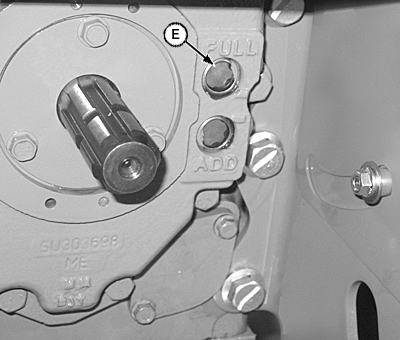
LV14260-UN-11MAY11A - Cap Screw (2 used)
B - Pickup Screen Cover
C - O-Ring
D - Pickup Screen
E - Sight Glass
Drain transmission-hydraulic oil. (See Changing Transmission-Hydraulic Oil and Filter in Section 50.) -
Remove two cap screws (A) and pickup screen cover (B).
-
Remove pickup screen (D) and inspect it for damage. Replace if necessary. Clean screen in solvent and blow dry with compressed air.
-
Inspect O-ring (C) for damage. Replace if necessary.
-
Carefully install screen so the front of screen is inserted in hole at front of differential case.
-
Install O-ring, cover and cap screws.
-
Fill system with transmission-hydraulic oil. (See Changing Transmission-Hydraulic Oil and Filter in Section 50.)
-
Check oil level at sight glass (E) after filling, and again after operating for five minutes.
|
JZ81662,00007DE-19-20120308 |