Use Draft Control
PY16034-UN-07JUN12
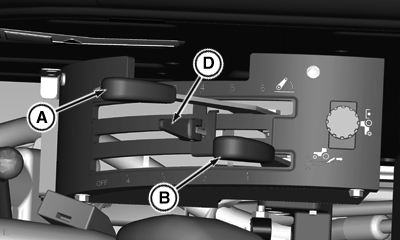
Control Levers of OOS
PY16172-UN-10SEP12
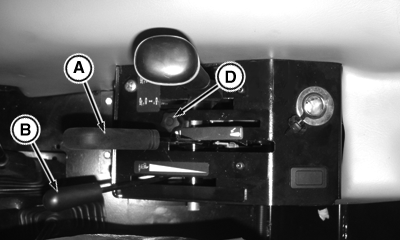
Control Levers of Cab
A - Position Control Lever
B - Draft Control Lever
D - Position Control Lever Stop
The hitch is equipped with variable draft control system.
Use draft load sensing when:
- Operating with a fully mounted implement in hill and swale terrain. The implement will raise and lower to follow the ground contours while maintaining a nearly constant depth.
- Operating in varying soil conditions. The implement is raised slightly to get through tough spots so you do not have to shift to a lower gear.
Draft control lever (B) controls amount of load required before hitch responds. When lever is moved all the way down, there is no draft sensing. Pulling the lever up reduces the amount of draft load required to override the position set by lever (A) and to raise the hitch.
Draft sensitivity ranges can be changed by repositioning the center link. (See Position Center Link, in this section, for additional information.)
For draft load sensing operation:
- Initially place position control lever (A) in its fully rearward position and the draft control lever (B) in the fully forward (least draft) position.
- With tractor moving, pull position control lever (A) backward to set implement operating depth. Set position control lever stop (D) so control lever can be brought back to the same exact position. When the tractor begins to slip, pull draft control lever (B) upward until desired draft sensing level is obtained.
- Position control lever (A) can also be raised slightly to override the draft control setting to help get through slippery spots without getting stuck.
- Position control lever (A) can be moved fully rearward to raise the hitch at the end of the field.
|
SD74272,00006B8-19-20131007 |