Come-Home Mode
APY35464-UN-20APR20
Cab Shown
PY18425-UN-11JUN14
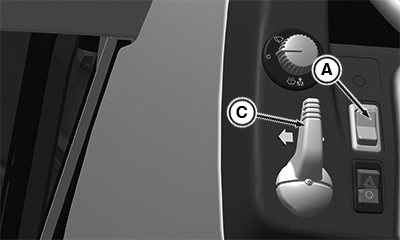
A - Roll Mode Switch
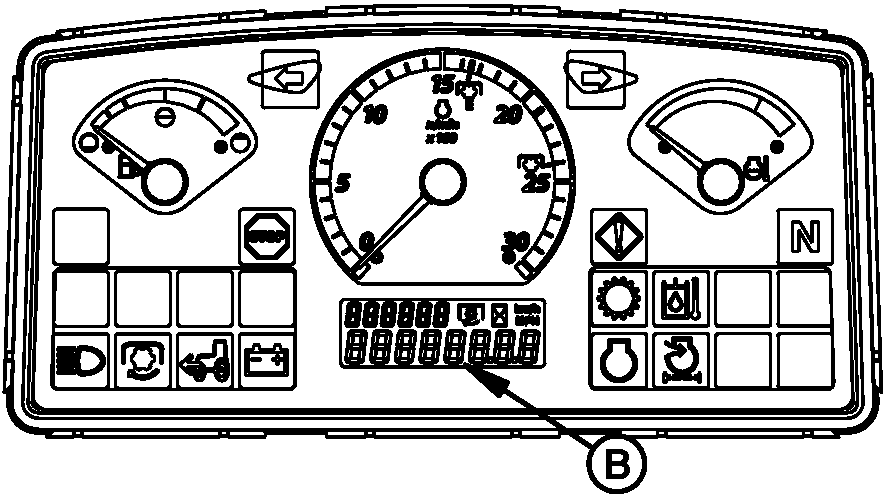
B - LCD Display
C - Turn Signal Switch
 CAUTION: When driving tractor in come-home mode, do not exceed
tractor limited capability.
CAUTION: When driving tractor in come-home mode, do not exceed
tractor limited capability.
Come-home mode may be used if tractor becomes inoperable due to failures and must be moved. While in come-home mode, engine speed is limited to 1500 rpm.
-
Turn key switch to START position.
-
Press and hold roll mode switch (A) for 5 seconds to display first control unit screen.
-
Stored diagnostic trouble codes (DTC) appear on instrument cluster control (ICC) LCD display (B). If codes appear, record the code information.
-
Move turn signal switch (C) to right-hand side to scroll and select PTR.
-
Press and release the roll mode switch (A) to enter PTR address space.
-
Use repeated cycles of the turn signal switch (C) to right-hand side to scroll the address 100 (diagnostic address).
-
Press and release roll mode switch to enable the data entry.
-
Move turn signal switch (C) to right-hand side to change 0 to 1.
-
Press and release roll mode switch (A) to save the data entry.
-
Stand up off the seat and then sit back down. There must be an active code for PTR523966.31 – come home mode detected. The throttle must be limited to 1500 rpm.
-
Step on brake pedal momentarily.
CAUTION: Before operating tractor verify correct operation of
steering and brakes. In some situations braking may require additional
force due to lower hydraulic pressure. -
Move range shift lever in A range and gearshift lever in first gear, depress clutch pedal and put the Forward, Neutral, Reverse lever in FORWARD.
-
Release clutch pedal, there must be a 3-4 seconds delay and clutch must slowly engage.
NOTE: Come home mode deactivate, if the ignition off. Perform the same procedure for activation of come home mode.
|
LGCKF7U,000055E-19-20200514 |