Attach Implements to 3-Point Hitch
-
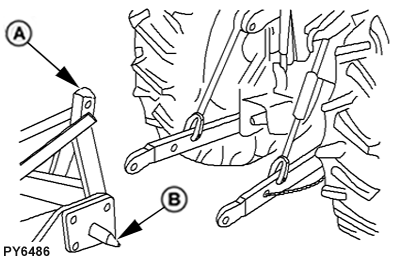
PY6486-UN-13MAR07Align Hitch Points
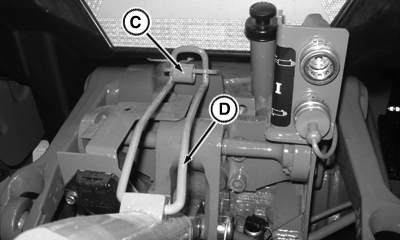
PY16602-UN-27AUG13Locking Tab and Clip
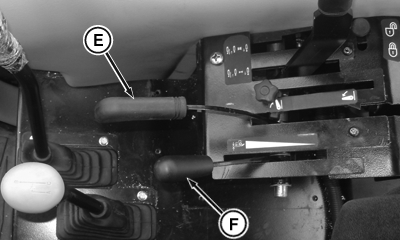
PY16603-UN-16AUG12Right Side Controls - Cab Shown
A - Implement
B - Implement Hitch Pins
C - Tab
D - Center Link Locking Clip
E - Position Control Lever
F - Draft Control Lever
Be sure drawbar will not interfere. If necessary, move drawbar ahead, or remove it. Check for any other potential interference. -
 CAUTION: Prevent unexpected movement of hitch by placing draft
sensing lever in the forward or OFF position before attaching implement
to hitch.
CAUTION: Prevent unexpected movement of hitch by placing draft
sensing lever in the forward or OFF position before attaching implement
to hitch.Back tractor up to implement (A) so hitch points align. Place transmission in neutral (N), stop the engine and engage brakes BEFORE leaving the tractor seat.
IMPORTANT: Be sure to stop the engine and engage park brake before entering the area between tractor and implement.
-
Slip draft links over implement hitch pins (B), and retain with quick-lock pins.
NOTE: Quick-lock pins can be stored on draft links (through holes in sway chain ears) when not in use.
-
To remove center link from transport hook, lift center link locking clip (D), and rotate tab (C) to rear of center link clip.
-
Attach center link to implement top mast.
-
Adjust center link and lift links as necessary. (See Leveling Hitch, in this section.)
-
CAUTION: To avoid bodily injury or machine damage whenever an
implement, implement quick coupler, or other attachment is connected
to the tractor 3-point hitch, check full range of operation for interference,
binding or PTO separation.
Using position control lever (E), lower and raise implement slowly and check for any point of interference.
|
SV86979,000009C-19-20140708 |