Replace Air Cleaner Elements
|
Service Interval—Annually* * Interval can vary according to operating conditions |
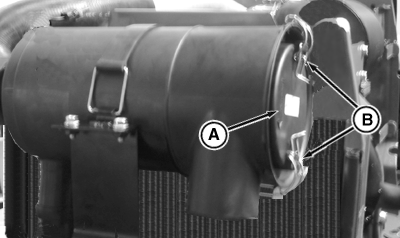
PY16777-UN-03JAN13
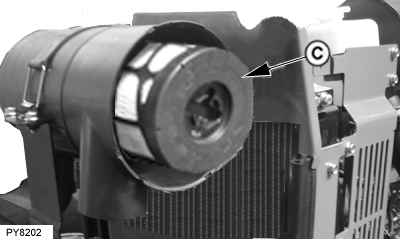
PY8202-UN-22FEB08
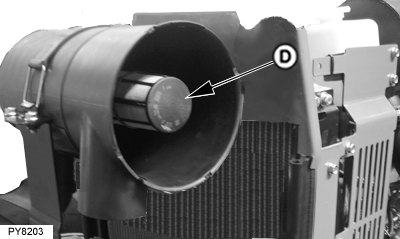
PY8203-UN-22FEB08
A - Cover
B - Clips
C - Primary Element
D - Secondary Element
-
Open the hood. (See Remove Side Screen in Service section.)
-
Release clips (B).
-
Remove cover (A).
-
Rotate Primary element filter (C) counter-clockwise to remove. Do not use excessive force. If filter does not pull out with ease, move side-to-side to remove safely. Remove primary element (C).
-
Clean out any dirt in canister taking care not to damage the secondary filter element.
-
IMPORTANT: Remove secondary element (inner element) ONLY if it is to be replaced. DO NOT attempt to clean secondary element.
If secondary element is replaced, install new element immediately to prevent dust from entering air intake system.
Removal of the secondary element (D) is similar to removal of the primary element.
NOTE: 1. When installing the air cleaner canister, make sure that the dust unloader valve is facing down.
2. Make sure that both of the primary filter and secondary filter are sealed/seated/installed properly. Also clips on the outer cover of the air cleaner are fixed properly.
-
Install new secondary element filter (D) carefully and lock the filter by rotating the ¼ turn in clockwise direction.
-
Install the new primary element filter (C) and lock the filter element by turning ¼ turn clockwise
-
Install cover (A) and raise clips (B).
-
Close the hood.
|
AH98466,0000904-19-20130107 |