Adjust Front Axle Tread Width (2WD) — High Clearance
P13207-UN-20SEP04
P13208-UN-20SEP04
P13209-UN-20SEP04
P13210-UN-20SEP04
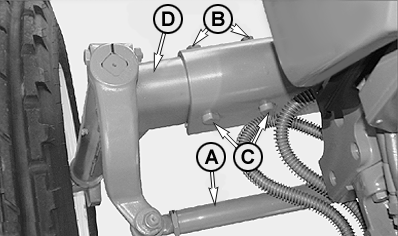
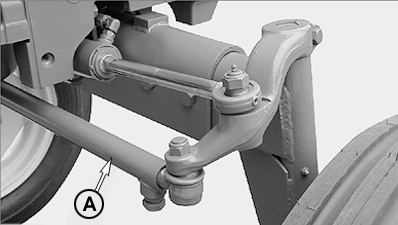
A - Tie Rod
B - Nut
C - Cap Screw
D - Axle Knees
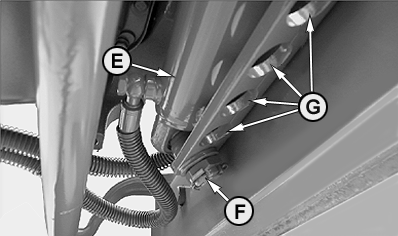
E - Steering Cylinder
F - Lock Nut
G - Holes
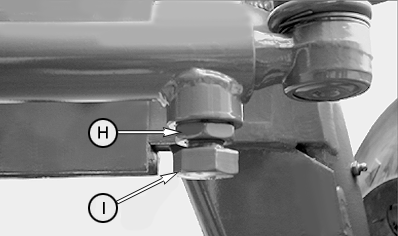
H - Lock Nut
I - Bolt
IMPORTANT: DO NOT place jack under engine oil pan.
IMPORTANT: If front loader or similar implement is installed on the High Clearance version, the front axle tread has to be set at the minimum width.
-
Jack up front end of tractor.
-
When making large tread adjustments it may be necessary to change the tie rod length (A) before or during axle adjustments. Unscrew lock nut (H) and remove bolt (I) to do this. After adjustment tighten lock nut (H) to 210 N•m (180 lb-ft).
-
Change the steering cylinder (E) anchoring position to axle body in relation to the change of tread width using the available holes (G). Tighten lock nut (F) to 625 N•m (460 lb-ft).
-
Remove nuts (B) and cap screws (C) from front axle (two on each side).
-
Slide axle knees (D) to desired position. Both sides should be adjusted to same spacing.
-
Reinstall cap screws and nuts on each side. Tighten hardware to 150 N•m (110 lb-ft).
-
Set toe-in. Refer to “Check Toe-In” and “Adjust Toe-In” for your axle type in this Section.
|
MK41968,0000276-19-20071023 |