Check and Adjust Clutch Pedal Free Play
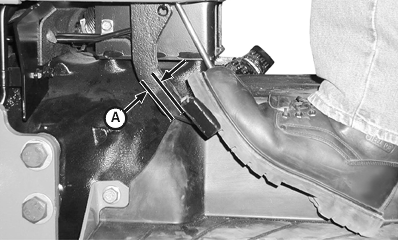
LV6240-UN-09FEB01
OOS Shown
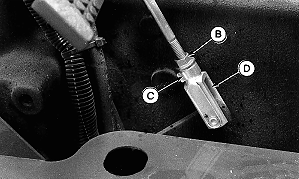
M46979A-UN-22APR94
OOS Shown
A - Clutch Pedal Allowable Free Play
B - Jam Nut
C - Clip Pin
D - Clevis
|
Service Interval — Every 50 hours |
OOS
Measure free play at top of pedal stroke (A). Ensure free play is within specification.
| Item | Measurement | Specification |
| Clutch Pedal | Free Play | 35 mm (± 2 mm) |
If free play is not within specification, adjust clutch linkage as shown below.
-
Remove clip pin (C).
-
Loosen jam nut (B).
-
Rotate clevis (D) as necessary to obtain the specified free play.
-
Tighten jam nut and install clevis and clip pin.
Cab and IOOS
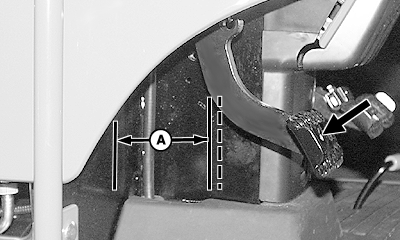
LV9708-UN-28AUG04
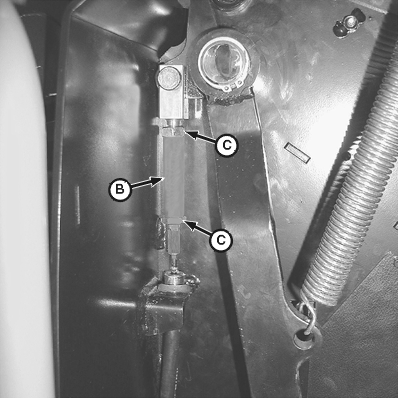
LV6536-UN-14MAR01
A - Firewall-to-Edge of Clutch Pedal Arm
B - Turnbuckle
C - Jam Nuts
NOTE: IOOS shown; cab tractor similar.
Left console panel removed for clarity of photo.
Measure distance from firewall-to-edge of clutch pedal arm (A). Depress clutch pedal (bold arrow) until resistance is felt and measure same distance. The difference between the recorded measurements is clutch pedal free play. If free play is not within specification, adjust clutch linkage.
| Item | Measurement | Specification |
| Free Play | Distance | 32—38 mm (1.260—1.496 in.) |
-
Loosen jam nuts (C).
-
Turn turnbuckle (B):
- Counterclockwise to increase free play
- Clockwise to decrease free play
-
Tighten jam nuts.
|
PX07220,0001232-19-20090814 |