Information Display (Roll Mode Switch)
CPA0002720-UN-05MAY16
CPA0002719-UN-05MAY16
(B)
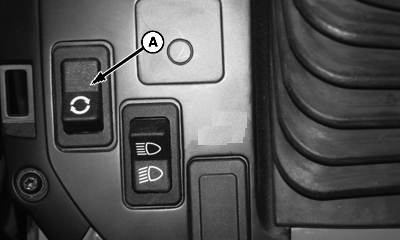
A - Roll Mode Switch
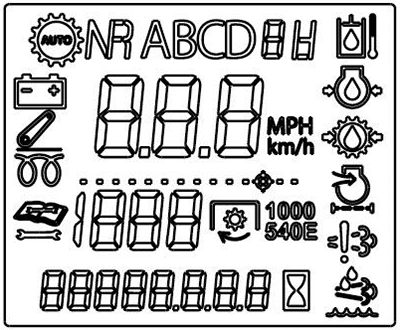
B - Information Display
Roll mode switch (A) is used to gain access to diagnostic mode of information display (B).
The diagnostic mode has two levels of access; Customer and Technician.
- Customer access— Press and hold roll mode switch for 5 seconds to begin diagnostic session. This action allows access to see diagnostic trouble codes and a limited amount of diagnostic addresses at the information display (B).
- Technician access— Only for John Deere dealer use. Accesses everything in customer mode plus vehicle set up, configuration, and calibration.
Customer access; recall, record, and clear diagnostic trouble codes:
- Press and hold the roll mode switch for 5 seconds to begin diagnostic session.
- Upon entering diagnostics, any active or previously active codes automatically appear in a scrolling fashion. Each one shows the control unit (three letter abbreviations) and the code number (XXXXXX.XX).
- To view or clear diagnostic trouble codes for any given control unit, do the following:
-
Use the right turn signal switch to scroll to the desired control unit.
-
Press and release the roll mode switch to enter the diagnostic addresses for that desired control unit.
-
Use the right turn signal switch to scroll to diagnostic address 001 for that desired control unit.
-
If codes are present the word "codes" appears. If not, the word "none" appears.
-
Press and release the roll mode switch to view all code details for this control unit.
-
Any codes present in that control unit appears there in scrolling fashion for multiple codes.
-
To access the option for clearing codes for this selected control unit, press and release the right turn signal switch.
-
The question "CLR ?" appears.
-
To clear the codes, press and release the roll mode switch.
-
To go back to the entire control unit list, press and release the left turn signal switch.
-
Proceed to the next desired control unit by repeating steps 1-10.
|
CP00834,0001E7D-19-20160505 |