Attach PTO-Driven Implement
 CAUTION:
TS1644-UN-22AUG95
Keep tractor master shield and driveline shields in place at all times. Make sure rotating shields turn freely.
Wear close fitting clothing. Stop the engine and be sure PTO driveline is stopped before making adjustments, connections, or cleaning out PTO driven equipment.
To avoid injury, stop engine before attaching implement or working in area of implement hitch.
-
IMPORTANT: If equipped, remove clevis assembly on drawbar when using PTO-driven equipment.
The drawbar must be in extended hole position to attach PTO-driven implement.
Short position hole should never be used for PTO-driven implement.
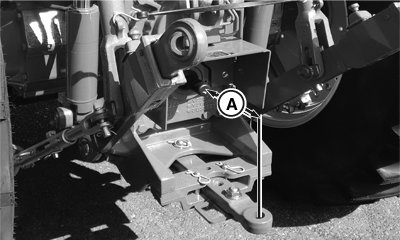
PY21086-UN-08MAY15A - PTO Shaft-to-Pin Hole Distance
Stop engine and remove key. (See Stop the Engine in Engine Operation section.) -
Lock drawbar in center, no-sway position. (See Adjust Drawbar Side-to-Side in Hitch and Drawbar Operation section.)
-
Put drawbar in EXTENDED position. (See Adjust Drawbar Length in Hitch and Drawbar Operation section.)
-
Remove clevis assembly, if equipped.
PTO Shaft
Distance from PTO Shaft End to Hitch Pin Hole (A)
540 rpm - 6 Splines1
356 mm (14.0 in.)
1000 rpm - 21 Splines1
406 mm (16.0 in.)
-
Attach implement to drawbar before connecting PTO driveline. Raise hitch to full-up (transport) position if not used.
If implement will be connected to 3-point hitch, be sure drawbar will not interfere. Remove if necessary.
-
Lift up PTO shield (if equipped).
-
Turn PTO shaft by hand to line up splines. Connect driveline to PTO shaft. Pull out on shaft to be sure driveline is locked to PTO shaft.
-
Lower PTO shield (if equipped) to centered position.
-
Check for interference.
|
1 35 mm
(1-3/8 in.) Shaft Diameter
|
CP00834,0001EB1-19-20160512 |