PTO Speed Selection
CPA0002739-UN-17MAY16
P17795-UN-13JAN16
Information Display
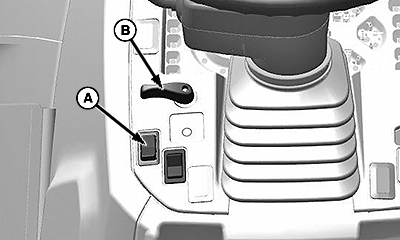
A - Roll Mode Switch
B - Turn Signal Lever
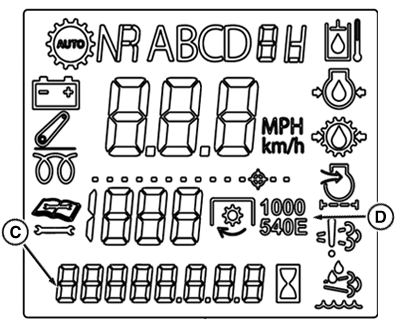
C - Information Display
D - PTO Speed Indicator
-
Start Tractor.
-
Toggle Roll Mode Switch (A)
-
Default PTO speed indication shall be blank.
-
“Pto SEL” will be shown on the information display (C)
-
Toggle Left Turn Switch (B) to select desired PTO Speed.
-
Observe the PTO Symbols 540 & 1000 (D)
-
Toggle Roll Mode Switch (A) once more to set selected PTO Speed.
|
CP00834,0001F34-19-20160517 |