Disabled Exhaust Filter Cleaning
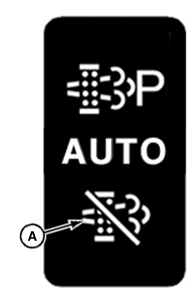
IMPORTANT: Exhaust filter cleaning switch (A) is a momentary contact switch. The default mode of operation is automatic (AUTO) exhaust filter cleaning. Recommended operation of vehicle is in the automatic (AUTO) exhaust filter cleaning mode.
LV23059-UN-12SEP14
Exhaust Filter Cleaning Switch - Disable
LV23060-UN-12SEP14
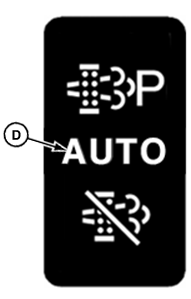
Exhaust Filter Cleaning Switch - AUTO
CPA0002832-UN-12JUN16
A - Exhaust Filter Cleaning Switch - Disable
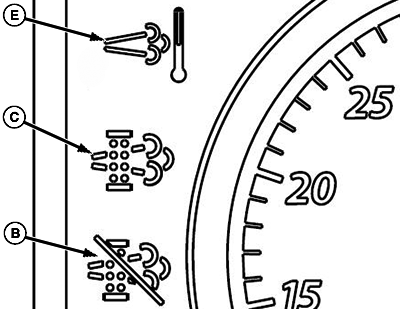
B - AUTO Cleaning Disabled Indicator
C - Exhaust Filter Indicator
D - Exhaust Filter Cleaning Switch - AUTO
E - Engine Emissions Temperature Indicator
If your vehicle must be used in a situation not suited for higher temperatures created during exhaust filter cleaning, temporarily disabling the system is possible. Be sure to reset to automatic (AUTO) mode as soon as possible.
To engage AUTO cleaning disabled mode, press, and hold bottom of exhaust filter cleaning switch (A) until AUTO cleaning disabled indicator (B) on display illuminates.
While in disabled mode, if system determines that exhaust filter requires cleaning, exhaust filter indicator (C) illuminates. Exhaust filter cleaning must be reset to automatic (AUTO) exhaust filter cleaning mode. To reset exhaust filter cleaning to Automatic (AUTO) (D) press, and hold bottom of exhaust filter cleaning switch (A). When AUTO cleaning disabled indicator (B) on display turns off, system is in automatic (AUTO) exhaust filter cleaning mode.
Anytime tractor is shutoff and restarted, system is reset to automatic (AUTO) exhaust filter cleaning mode.
Engine emissions temperature indicator (E) remains illuminated during exhaust filter cleaning.
Do not disable automatic exhaust filter cleaning unless it is necessary. If disabled mode is used frequently, system, eventually, reduces engine performance requiring a stationary parked exhaust filter cleaning.
|
CP00834,00021EC-19-20160613 |