Operate Mid SCV Multi-Function Control Lever—If Equipped
IMPORTANT:
PULV004691-UN-11JAN10
LV16017-UN-28AUG12
LV16019-UN-28AUG12
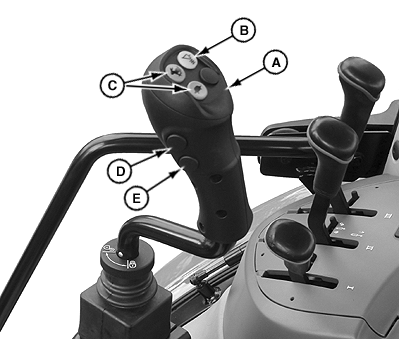
A - Multi-Function Control Lever
B - Activate Front Loader Dampening
C - HI/LO Gear Shift buttons
D - Third Function Retract/Raise
E - Third Function Extend/Lower
 CAUTION: Overheated hydraulic oil can cause personal injury
and component malfunctions. To prevent hydraulic oil from overheating,
DO NOT hold multi-function control lever in operating position for
an extended time.
CAUTION: Overheated hydraulic oil can cause personal injury
and component malfunctions. To prevent hydraulic oil from overheating,
DO NOT hold multi-function control lever in operating position for
an extended time.
Basic Functions
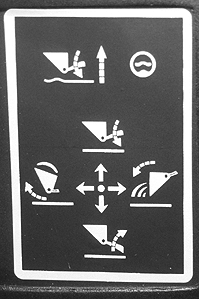
- Lever to rear = Raise front loader
- Lever to front as far as perceptible resistance = Lower front loader
- Lever to front beyond perceptible resistance (detent) = Front loader in float position
- Lever to left = Bucket tips up
- Lever to right = Bucket tips down
Advance functions
Multi-function lever (A) permits two control valves to be operated at the same time.
Pressing buttons (D) and (E) actuates third-function mid-mount valves of the implement, permitting additional functions to be controlled.
NOTE: For more information, see implement operator's manual. Front-loader dampening must be activated before it can be used.
Front-loader dampening is switched on and off at button (B). When front-loader dampening is switched on, the LED in button (B) lights up.
Gear shift switches (C) allow the gears at the transmission to be shifted.
CAUTION: When the front loader is not in use, the multi-function
lever must be locked. To do this, turn transport locking ring (G)
and check that the multi-function lever cannot be moved. If this is
not done, the front loader may be inadvertently actuated while the
tractor is in motion, which could lead to serious accidents.
Activate and de-activate front-loader dampening
- Hold button (B) and then switch on the ignition.
- Hold button (B) for another 5 seconds until LED in the button starts to flash.
- Release the button and press it again within 5 seconds to gain access to the programming mode.
-
The current programming of front-loader dampening is shown as
follows:
LED off all the time ==> Front-loader dampening de-activated
LED on all the time ==> Front-loader dampening activated
- Press button (B) to activate or de-activate front-loader dampening.
- To leave the programming mode and save the setting, press any button on the multi-function control lever or switch ignition off.
Transport Lock
LV16018-UN-28AUG12
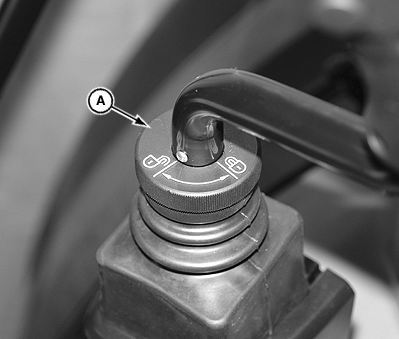
Transport Lock
A - Transport Locking Ring
CAUTION: When the front loader is not in use, the multi-function
lever must be locked. To do this, turn locking ring (A) and check
that the multi-function lever cannot be moved. If this is not done,
the front loader may be inadvertently actuated while the tractor is
in motion, which could lead to serious accidents.
- To lock the multi-function control lever for transport, turn locking ring (A) clockwise.
- Turn counterclockwise to unlock.
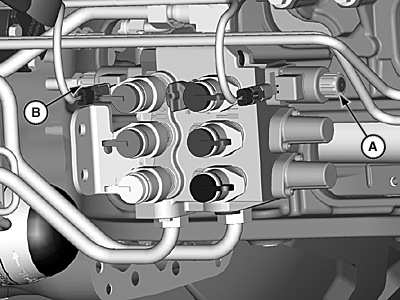
Manually Operating Third-Function (Electro-Hydraulic) Valve Section
LV14617-UN-11AUG11
Third-function (grapple) valve section can be manually operated if an electrical malfunction occurs.
Insert a small diameter punch through the access hole (A or B) and push spool to either extend or retract cylinders as needed to release load.
|
JZ81662,0000E52-19-20120823 |