Adjust Seat—Open Operator's Station
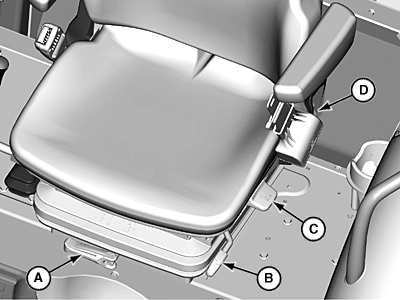
LV14505-UN-09SEP11
Mechanical OOS Seat
A - Weight Adjustment Lever
B - Forward/Backward Adjustment Lever
C - Swivel Adjustment Lever (If Equipped)
D - Backrest Tilt Adjustment Lever
 CAUTION: To avoid accidents, adjust seat before driving.
IMPORTANT: While adjusting seat, make sure all controls can be easily accessed.
Adjust to suit operator. Five seat adjustments are available:
Weight Adjustment
- Flip out weight adjustment lever (A).
-
Turn lever clockwise (increase load) or counterclockwise (decrease
load) to reach desired weight setting in display window.
IMPORTANT: Stop turning lever (A) counterclockwise (decreasing load) when seat reaches minimum weight position and lever resistance increases. Seat mechanism could be damaged.
NOTE: Adjustable weight range is 50–130 kg (110–285 lb). Suspension should not bottom out when properly adjusted.
- Return lever (A) to lock seat in position.
Forward/Backward Adjustment
- Lift forward/backward adjustment lever (B) up.
- Slide seat to desired position.
- Release forward/backward adjustment lever (B) to lock seat in position.
Swivel Adjustment (If Equipped)
- Lift swivel adjustment lever (C) up.
- Rotate seat to desired position. The seat turns 15° to the left and right. The seat locks at 7.5° intervals.
- Release swivel adjustment lever (C) to lock seat in position.
Backrest Tilt Adjustment
- Lift backrest tilt adjustment lever (D).
- Tilt backrest forward or rearward as desired.
- Release backrest tilt adjustment lever (D) to lock seat in position.
Height Adjustment
-
Lift seat pan up until a click is heard.
NOTE: Three height positions are available.
- Lift seat pan up past highest position, then lower into desired position.
|
JZ81662,000107C-19-20140122 |