Install Rear Cast Iron Weights—If Equipped
LV9684-UN-17AUG04
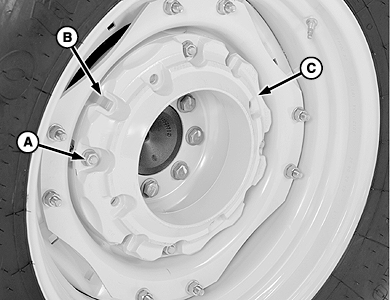
Single Wheel Weight Shown
LV9692-UN-19AUG04
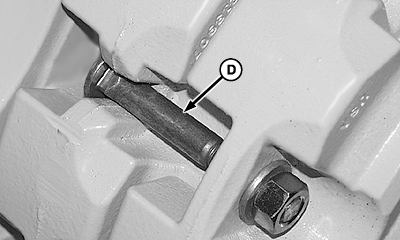
Install Bolt in Slot (Additional Weight)
A - Nut, 5/8-11 (4 used)
B - Slot (4 locations)
C - Wheel Weight
D - Round Head Bolt (4 used)
 CAUTION: Optional cast iron weight weighs 43 kg (93 lb) each.
Handle with care! Use appropriate equipment or have the job done by
your John Deere dealer.
CAUTION: Optional cast iron weight weighs 43 kg (93 lb) each.
Handle with care! Use appropriate equipment or have the job done by
your John Deere dealer.
-
Remove wheel.
-
Attach weight (C) to wheel disks using four special round head bolts, washers and nuts (A). Tighten nuts to specifications.
Item Measurement Specification Wheel Weight-to-Disk Nuts Torque 215 N·m (159 lb-ft) -
Install additional weights:
-
Insert four round head bolts (D) through slots (B) of first weight. Install bolts with square neck in slot (as shown).
-
Align mounting holes of second weight with round head bolts and install weight. Fasten with washers and nuts. Tighten nuts to specifications.
Item Measurement Specification Wheel Weight-to-Weight Nuts Torque 215 N·m (159 lb-ft)
-
-
Install wheel and tighten mounting hardware. (See ”Tighten Bolts—Rear Axle” in ”Wheels, Tires and Treads” section.)
-
Tighten wheel weights and mounting hardware again after a few hours service. Check regularly.
|
JZ81662,00010DF-19-20130722 |