Replace Fan Belt (Except 5075M)
-
NOTE: Fan drive belt is equipped with an automatic tensioner which does not require adjustment.
Place tractor in park and SHUT OFF engine. Remove key.
-
LV14667-UN-18AUG11Remove Belt
LV14668-UN-18AUG11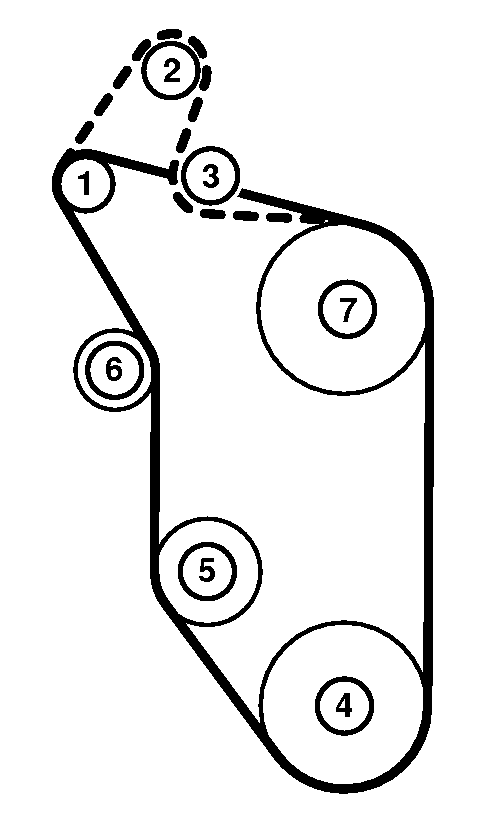
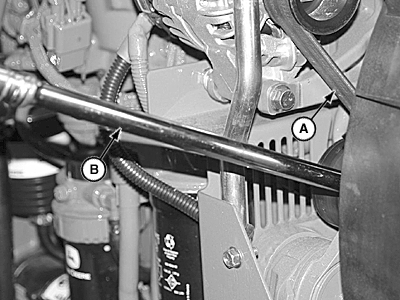
LV9587-UN-06AUG04A - Belt
B - Breaker Bar
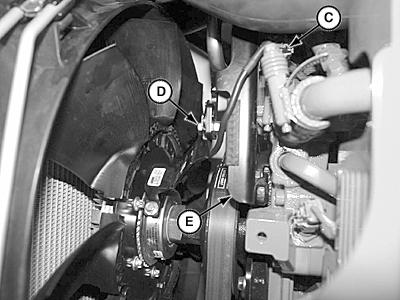
C - Fan Clutch Connector
D - Locknut and Flanged Screw
E - Wire Harness Support Bracket
Release tension on belt using a long-handle 1/2 in. drive breaker bar (B) to pull tensioner away from engine.Remove belt (A) from alternator pulley.
-
Release tension on tensioner and remove breaker bar.
-
Unplug fan clutch (C).
-
Remove locknut and flanged screw (D) from fan clutch wire harness support (E).
-
Remove belt by bringing it over the fan clutch wire harness support, the cooling fan, and slipping it between the fan blades and fan shroud.
-
Install new belt in reverse order of removal.
Belt Routing
1
Alternator
2
Air Conditioning Compressor1
3
Idler1
4
Crankshaft Pulley
5
Coolant Pump
6
Tensioner
7
Fan Drive
-
Install fan clutch wire harness support with locknut and flanged bolt.
Tighten to specification.
Item Measurement Specification Wire Harness Support Lock Nut Torque 14 N•m -
Use breaker bar to push tensioner into position for belt installation. (Refer to Inspect Fan Belt Tensioner in this section.)
|
1 Cab only.
|
JZ81662,00010F1-19-20140122 |