Operate Rear Hitch Controls
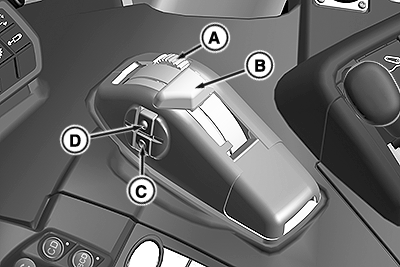
RXA0153750-UN-08SEP16
A - Position Control Lever Stop
B - Position Control Lever
C - Quick Lower Button
D - Quick Raise Button
 CAUTION: To prevent possible injury, use only position control
lever (A) when attaching or detaching implements. Do not use quick
raise/lower buttons (C and D).
CAUTION: To prevent possible injury, use only position control
lever (A) when attaching or detaching implements. Do not use quick
raise/lower buttons (C and D).
IMPORTANT: Load depth control setting automatically adjusts actual hitch position. Change load depth setting as required per application. See “Load Depth Control” in this section.
-
Position Control Lever (B): Position
control lever (B) controls raise or lower movement of rear hitch-mounted
implement and ground depth penetration. Pull lever rearward to raise
and push lever forward to lower.
-
Transport: Pull lever full rearward
past “0” to transport implement. Ensure that lever is
in transport lock position (lever flipped over latch at the padlock
symbol).
NOTE: Quick raise/lower buttons (C and D) are disabled when
position control lever is in transport lock position. Hitch rises
to transport lock position when engine is started.
-
Float: Push lever full forward to
float implement, allowing it to follow the ground contour.
NOTE: Ensure that implement skids or height gauge wheels are
set correctly to carry full implement weight. Ensure that draft link
arms are adjusted for any required lateral float.
-
Transport: Pull lever full rearward
past “0” to transport implement. Ensure that lever is
in transport lock position (lever flipped over latch at the padlock
symbol).
NOTE: Quick raise/lower buttons (C and D) are disabled when
position control lever is in transport lock position. Hitch rises
to transport lock position when engine is started.
- Position Control Lever Stop (A): Push down and rotate wheel (A) until stop sets to desired working depth. Implement returns to set depth when position control lever is pushed forward to contact stop. A few minutes of implement operation helps determine the best depth. If necessary to lower hitch below the preset depth stop, lift position control lever (B) and push forward past stop.
- Quick Raise and Lower Buttons (C and D): Depress quick raise button (D) to raise the hitch to the upper limit setting. Depress the quick lower button (C) to return the hitch to the set working depth.
|
BH38674,0000557-19-20161117 |