Access and Replace Battery
Remove Right-Hand Steps
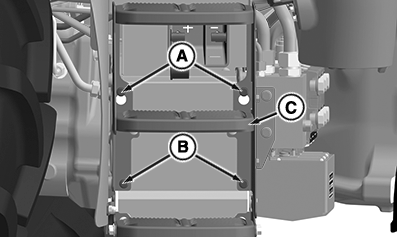
RXA0154360-UN-01NOV16
A - Position Bolts
B - Retaining Bolts
C - Steps
-
Loosen but do not remove position bolts (A).
-
Remove retaining bolts (B).
-
Pull step assembly upward and away from the machine to remove.
Remove Battery Hold Down
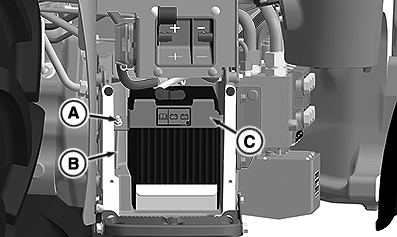
RXA0154410-UN-01NOV16
A - Nut
B - Retaining Bolt
C - Hold Down Bracket
-
Remove nut (A) from retaining bolt (B).
-
Remove hold down bracket (C) and retaining bolt.
Remove and Replace Battery
NOTE: Verify battery orientation when replacing. Battery cables will not reach battery posts if battery is installed incorrectly.
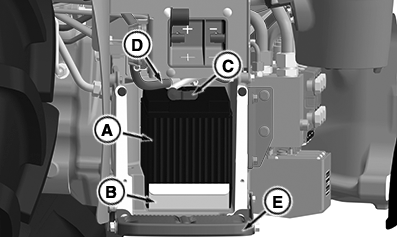
RXA0154411-UN-01NOV16
A - Battery
B - Battery Slide Out Tray
C - Negative Battery Cable
D - Positive Battery Cable
E - Bottom Step
-
Pull battery (A) and slide out tray (B) away from the battery compartment.
-
Set battery on bottom step (E).
-
Disconnect the negative battery cable (C).
-
Disconnect the positive battery cable (D).
-
Test or remove battery as required.
-
Replace battery in opposite order.
|
DP51502,000255D-19-20161206 |